
Growing on Instagram in 2026 is more competitive than ever. Millions of creators publish Reels, Stories, and carousel posts every day, making it harder to stand out. The good news is that artificial intelligence has completely changed how creators produce content. Today, the **Best AI Tools for Instagram Creators in 2026** can help you write better captions, generate content ideas, edit photos and videos, design eye-catching graphics, create viral hashtags, schedule posts, and save hours every week.
Whether you’re an influencer, small business owner, digital marketer, freelancer, coach, or beginner creator, AI tools can improve both your productivity and content quality. Instead of spending hours brainstorming ideas or editing videos manually, you can use AI to automate repetitive tasks and focus on creating engaging content that grows your audience.
In this complete guide, you’ll discover the best AI tools for Instagram creators, including free and premium options. We’ll compare their features, pricing, pros and cons, and help you choose the right tool based on your needs. You’ll also learn practical tips, real-world examples, and expert recommendations to grow faster on Instagram in 2026.
If you’re also creating content for other platforms, check out our related guides:
– Best AI Tools for YouTubers in 2026
– Top 10 AI Tools for Content Creators in 2026
– Best AI Tools for Bloggers in 2026
– Best AI Tools for SEO in 2026
– Best Free AI Thumbnail Makers in 2026
– AI Agents in 2026: Complete Guide for Beginners
– Best AI Tools for Freelancers in 2026
By the end of this guide, you’ll know exactly which AI tools can help you create better Instagram content, increase engagement, and grow your account faster in 2026.
—
Table of Contents
- – What Are AI Tools for Instagram Creators?
- – Why Instagram Creators Need AI in 2026
- – Quick Comparison Table
- – Best AI Tools for Instagram Creators
- – ChatGPT
- – Canva AI
- – Adobe Express AI
- – CapCut AI
- – InVideo AI
- – Opus Clip
- – Jasper AI
- – Copy.ai
- – Flick
- – Metricool
- – Buffer AI Assistant
- – Later AI
- – Predis.ai
- – Vista Social
- – How to Choose the Best AI Tool
- – Free vs Paid AI Tools
- – Frequently Asked Questions
- – Final Verdict
Why Trust This Guide?
This guide is based on hands-on research, feature comparisons, user experience, pricing analysis, and industry best practices. Every tool has been selected because it offers real value for Instagram creators looking to save time, improve content quality, and grow their audience in 2026.
—
Quick Comparison Table
| AI Tool | Best For | Free Plan | Starting Price | Rating |
|---|---|---|---|---|
| ChatGPT | Captions, content ideas & scripts | Yes | From $20/month | ⭐⭐⭐⭐⭐ |
| Canva AI | Instagram posts, Stories & Reels design | Yes | From $15/month | ⭐⭐⭐⭐⭐ |
| Jasper AI | Marketing copy and social media captions | Trial | From $49/month | ⭐⭐⭐⭐☆ |
| Predis.ai | AI-generated Instagram content | Yes | From $29/month | ⭐⭐⭐⭐☆ |
| Metricool | Scheduling and analytics | Yes | From $18/month | ⭐⭐⭐⭐☆ |
| CapCut AI | Short-form video editing | Yes | From $10/month | ⭐⭐⭐⭐⭐ |
| Adobe Express AI | Professional social media graphics | Yes | From $9.99/month | ⭐⭐⭐⭐☆ |
1. ChatGPT
**Best For:** AI Caption Writing, Content Ideas, Scripts, Carousel Content
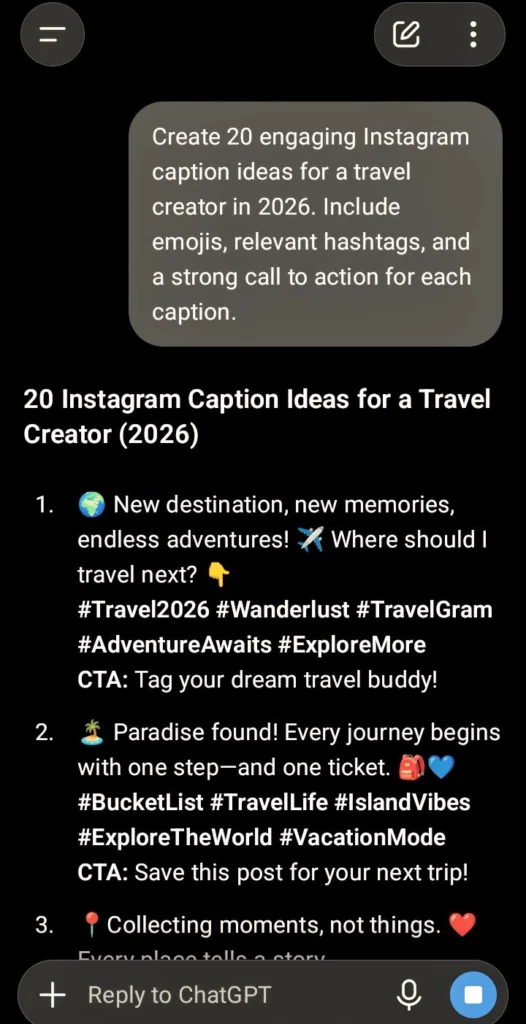
ChatGPT is one of the most powerful AI tools for Instagram creators in 2026. Whether you need engaging captions, viral Reel ideas, carousel post content, hashtag suggestions, or a complete monthly content calendar, ChatGPT can save hours of work.
Many creators use ChatGPT daily to brainstorm fresh ideas, write persuasive captions, improve storytelling, and generate content that matches their brand voice. It also helps create educational, motivational, and promotional posts in seconds.
Key Features
- – AI-generated Instagram captions
- – Reel and Story ideas
- – Content calendar planning
- – Caption rewriting
- – CTA generation
- – Hashtag suggestions
- – Brand voice customization
Pros
- – Beginner-friendly
- – Saves hours every week
- – High-quality writing
- – Supports multiple languages
- – Excellent for content planning
Cons
- – Requires good prompts
- – Some advanced features require ChatGPT Plus
Best For:
Creators, Influencers, Coaches, Bloggers, Businesses
—
2. Canva AI
**Best For:** Instagram Posts, Stories, Reels & Carousel Designs
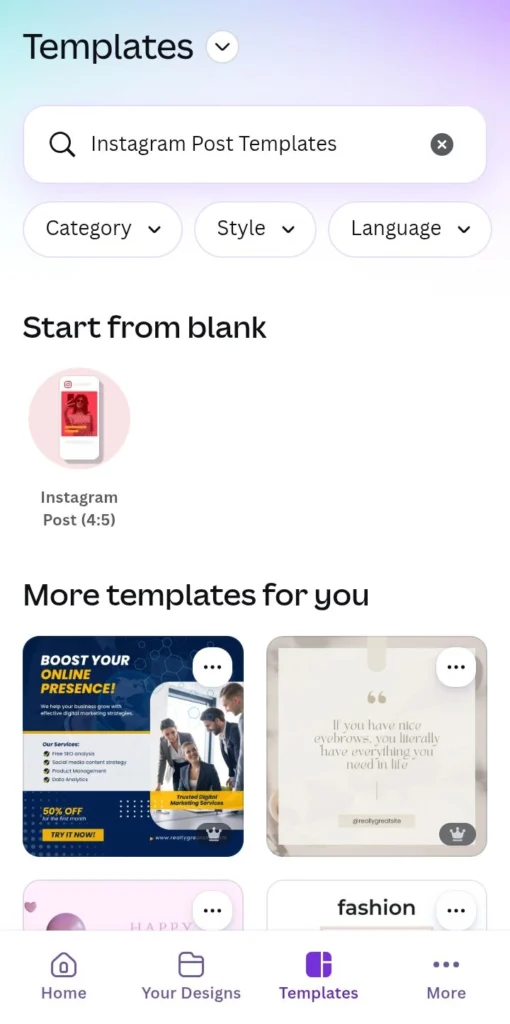
Canva AI is one of the best design platforms for Instagram creators. It allows users to create professional-looking posts, Stories, thumbnails, carousels, and marketing graphics without advanced design skills.
Its AI-powered tools can instantly generate images, remove backgrounds, suggest layouts, resize designs, and create eye-catching social media graphics.
Key Features
- – Magic Design
- – AI Image Generator
- – Magic Write
- – Background Remover
- – One-click Resize
- – Brand Kit
- – Ready-made Instagram Templates
Pros
- – Extremely easy to use
- – Thousands of templates
- – Great for beginners
- – Fast design workflow
- – Excellent collaboration tools
Cons
- – Premium templates require Canva Pro
- – AI credits are limited on the free plan
Best For:
Small Businesses, Influencers, Digital Marketers, Content Creators
—
3. Adobe Express AI
**Best For:** Premium Social Media Graphics
Adobe Express AI combines Adobe’s professional design experience with AI-powered creativity. Instagram creators can quickly generate social media posts, promotional banners, Stories, and Reels using smart AI tools.
The platform includes text effects, image enhancement, background removal, AI-generated artwork, and branding features.
Key Features
- – AI Image Generation
- – AI Text Effects
- – Background Removal
- – Professional Templates
- – Brand Assets
- – Social Media Resize
Pros
- – Professional-quality graphics
- – Fast editing
- – Easy publishing
- – Adobe ecosystem integration
Cons
- – Premium features require a paid plan
- – Slight learning curve for beginners
—
4. CapCut AI
**Best For:** Instagram Reels
Instagram Reels continue to dominate engagement in 2026, making CapCut AI one of the most valuable tools for creators. It simplifies video editing with AI-powered subtitles, automatic captions, background removal, voice enhancement, and trendy effects.
Instead of spending hours editing videos manually, creators can produce professional-quality Reels in just a few minutes.
Key Features
- – AI Auto Captions
- – AI Video Editing
- – Voice Enhancement
- – Background Removal
- – Trending Effects
- – Templates for Reels
- – Auto Cut
Pros
- – Excellent free version
- – Fast editing
- – Beginner-friendly
- – High-quality exports
Cons
- – Some AI tools require Pro
- – Internet connection needed for certain features
—
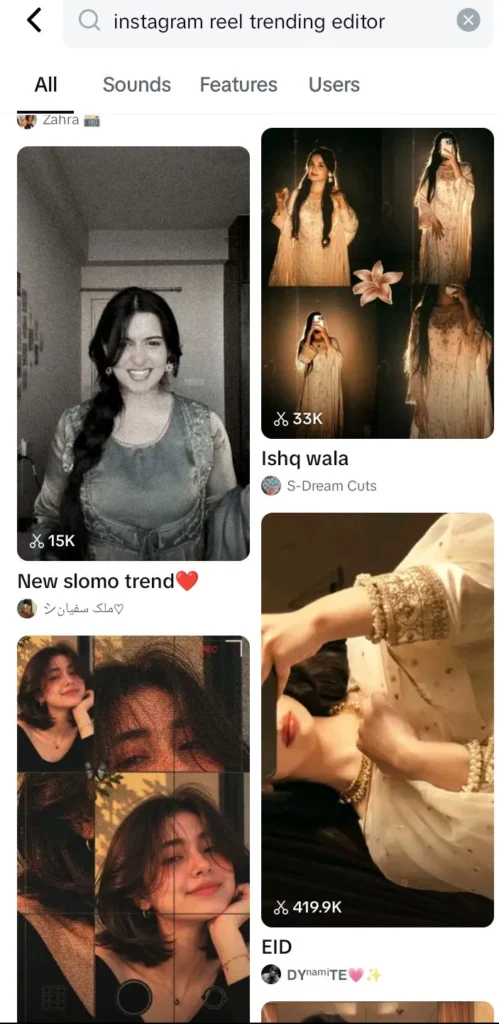
CapCut AI helps Instagram creators edit Reels faster with AI-powered auto captions, effects, transitions, and smart editing tools.5. InVideo AI
**Best For:** AI Video Creation for Instagram Reels
If you want to create high-quality Instagram videos without spending hours editing, InVideo AI is an excellent choice. Simply enter your topic or prompt, and the AI generates a complete video with visuals, transitions, subtitles, voiceovers, and background music.
This tool is especially useful for creators who publish educational, motivational, product review, or business content regularly.
Key Features
- – AI Video Generator
- – Text-to-Video
- – AI Voiceovers
- – Automatic Subtitles
- – Stock Media Library
- – One-Click Video Editing
- – Social Media Export
Pros
- – Creates videos in minutes
- – Professional-looking results
- – Beginner-friendly
- – Huge stock media library
Cons
- – Free version includes watermark
- – Premium plan needed for full exports
**Best For:** Coaches, Businesses, Influencers, Educational Creators
—
6. Opus Clip
**Best For:** Turning Long Videos into Viral Reels
Opus Clip uses AI to automatically identify the most engaging moments from long videos and convert them into short, vertical Instagram Reels.
If you also create YouTube videos or podcasts, this tool can save hours by automatically generating multiple short clips ready for Instagram.
Key Features
- – AI Clip Detection
- – Auto Captions
- – Viral Score
- – Smart Reframing
- – Face Tracking
- – One-Click Export
Pros
- – Saves editing time
- – Excellent caption quality
- – Great for repurposing content
Cons
- – Free plan has limitations
- – Best features require paid plan
—
7. Jasper AI
**Best For:** Marketing Captions & Brand Content
Jasper AI is designed for businesses, marketers, and creators who need high-quality marketing content. It creates engaging Instagram captions, product descriptions, promotional posts, and advertising copy while maintaining a consistent brand voice.
Key Features
- – AI Caption Generator
- – Marketing Templates
- – Brand Voice
- – Campaign Writing
- – AI Rewriting
- – Multiple Languages
Pros
- – Excellent marketing copy
- – Fast content generation
- – Easy to use
Cons
- – More expensive than some alternatives
- – Better suited for professional users
—
8. Copy.ai
**Best For:** Fast Social Media Copywriting
Copy.ai helps Instagram creators generate captions, promotional content, product launches, giveaways, and engaging social media posts within seconds.
It offers dozens of templates specifically designed for marketing and social media.
Key Features
- – AI Caption Generator
- – Product Descriptions
- – Promotional Posts
- – CTA Generator
- – Social Media Templates
Pros
- – Fast writing
- – Beginner-friendly
- – Multiple writing templates
Cons
– Limited free usage
– Premium required for advanced features
—
9. Flick
**Best For:** AI Hashtag Research & Caption Optimization
Hashtags still help Instagram categorize content and improve discoverability. Flick uses AI to recommend relevant hashtags based on your niche and competition.
It also helps write optimized captions and provides hashtag analytics.
Key Features
- – AI Hashtag Generator
- – Caption Writer
- – Hashtag Analytics
- – Keyword Suggestions
- – Content Planning
Pros
- – Improves hashtag strategy
- – Easy interface
- – Helpful analytics
Cons
- – Premium subscription required for full features
10. Metricool
**Best For:** Instagram Analytics & Scheduling
Metricool is an all-in-one social media management platform that helps creators schedule posts, monitor engagement, analyze performance, and track audience growth.
Its AI features also help improve captions and posting schedules.
Key Features
- – Instagram Scheduling
- – Analytics Dashboard
- – Competitor Analysis
- – AI Caption Assistant
- – Link in Bio
- – Multi-Platform Management
Pros
- – Detailed analytics
- – Easy scheduling
- – Great reporting tools
Cons
- – Advanced reports require paid plans
—
Real-World Example
Imagine you’re a travel creator posting three Instagram Reels every week.
Instead of spending 10–12 hours creating content manually, you could use this workflow:
- – ChatGPT generates Reel ideas and captions.
- – Canva AI designs carousel posts and Stories.
- – CapCut AI edits videos automatically.
- – Flick suggests high-performing hashtags.
- – Metricool schedules posts for the best engagement time.
Using this workflow can significantly reduce content creation time while helping you maintain a consistent posting schedule.
—
11. Buffer AI Assistant
**Best For:** AI-Powered Scheduling & Content Planning
Buffer has been a trusted social media management platform for years, and its AI Assistant makes creating Instagram content even easier. It helps generate engaging captions, rewrite posts, brainstorm ideas, and schedule content at the best times.
Whether you’re managing one account or multiple brands, Buffer AI simplifies your workflow and keeps your content calendar organized.
Key Features
- – AI Caption Generator
- – Content Calendar
- – Instagram Scheduling
- – Multi-Platform Publishing
- – Analytics Dashboard
- – Team Collaboration
Pros
- – Clean and beginner-friendly interface
- – Reliable scheduling
- – Helpful AI writing assistant
- – Affordable pricing
Cons
- – Limited features on the free plan
- – Advanced analytics require a paid plan
—
12. Later AI
**Best For:** Visual Instagram Planning
Later AI is one of the most popular platforms for Instagram creators who want to plan their feed visually. It offers drag-and-drop scheduling, AI-generated captions, hashtag suggestions, and detailed performance insights.
If maintaining a beautiful Instagram grid is important to your brand, Later AI is an excellent choice.
Key Features
- – Visual Content Planner
- – AI Caption Writer
- – Hashtag Suggestions
- – Best Time to Post
- – Link in Bio
- – Instagram Analytics
Pros
- – Beautiful visual planner
- – Easy scheduling
- – Great analytics
- – Beginner-friendly
Cons
- – Premium features require a paid plan
- – Free plan has posting limits
—
13. Predis.ai
**Best For:** Complete AI Instagram Content Creation
Predis.ai is one of the few tools built specifically for social media creators. It can generate captions, hashtags, complete carousel posts, videos, creatives, and content ideas using AI.
For creators who want an all-in-one Instagram solution, Predis.ai can dramatically reduce content creation time.
Key Features
- – AI Caption Generator
- – Carousel Creator
- – AI Video Generator
- – Hashtag Generator
- – Competitor Analysis
- – Social Media Calendar
Pros
- – Designed specifically for social media
- – Saves hours every week
- – Excellent content ideas
- – Easy to use
Cons
- – Advanced features require a premium subscription
- – Some AI-generated designs need manual editing
—
14. Vista Social
**Best For:** Businesses & Social Media Agencies
Vista Social is a powerful social media management platform that combines scheduling, AI writing, engagement tracking, reporting, and analytics in one dashboard.
It’s especially useful for agencies, freelancers, and businesses managing multiple Instagram accounts.
Key Features
- – AI Caption Generator
- – Content Scheduling
- – Social Inbox
- – Performance Analytics
- – Team Collaboration
- – Custom Reports
Pros
- – Excellent reporting
- – Strong collaboration tools
- – Supports multiple social platforms
- – Professional dashboard
Cons
- – More suitable for advanced users
- – Premium plans can be expensive
—
15. Grammarly AI
Best For: Proofreading, Caption Improvement & Grammar Correction
Grammarly AI is one of the best writing assistants for Instagram creators who want polished, professional, and error-free captions. Whether you’re writing promotional posts, educational content, or engaging Stories, Grammarly AI helps improve grammar, spelling, punctuation, tone, and clarity in seconds.
Beyond correcting mistakes, Grammarly AI can rewrite captions to sound more engaging, friendly, or persuasive while maintaining your unique writing style. It also suggests stronger vocabulary, better sentence structure, and more natural wording, making your Instagram content easier to read and more appealing to your audience.
Key Features
- AI Grammar & Spelling Checker
- AI Caption Rewriting
- Tone Detection
- Clarity & Readability Suggestions
- Vocabulary Enhancement
- Punctuation Correction
- Browser Extension & Mobile Support
Pros
- Easy to use for beginners
- Improves writing quality instantly
- Helps create professional captions
- Saves time on proofreading
- Free plan available
Cons
- Advanced AI features require a Premium subscription
- Focuses on writing rather than graphic or video creation
Best For: Influencers, Bloggers, Businesses, Social Media Managers, Students, and Content Creators.
Free vs Paid AI Tools
| Feature | Free AI Tools | Paid AI Tools |
|---|---|---|
| Cost | Free | Monthly or yearly subscription |
| Caption Writing | Basic AI-generated captions | Advanced, personalized captions with brand voice |
| AI Image Generation | Limited credits or features | Higher-quality images with more credits |
| Video Editing | Basic editing tools | Advanced AI editing, effects, and exports |
| Instagram Scheduling | Limited scheduled posts | Unlimited scheduling and automation |
| Analytics | Basic performance insights | Advanced analytics and detailed reports |
| Hashtag Suggestions | Basic recommendations | AI-powered hashtag research and optimization |
| Brand Kit | Limited or unavailable | Complete brand kit and customization |
| Team Collaboration | Usually unavailable | Multi-user collaboration and approval workflows |
| Export Quality | May include watermarks or lower-quality exports | High-resolution, watermark-free exports |
| Customer Support | Community or email support | Priority customer support |
| Best For | Beginners, students, and hobby creators | Businesses, agencies, influencers, and professional creators |
Investing in the best AI tools for Instagram creators in 2026 can significantly improve productivity, engagement, and overall content quality. Many creators start with free tools and upgrade as their audience grows.
Which Should You Choose?
If you’re just starting your Instagram journey, free AI tools like ChatGPT, Canva AI, Buffer, and CapCut provide more than enough features to create professional content.
However, if you’re running a business, managing clients, or publishing content daily, investing in premium AI tools can save dozens of hours every month and significantly improve your content quality.
The best AI tools for Instagram creators in 2026 can help you save time, improve content quality, and maintain a consistent posting schedule. Choosing the right tool depends on whether your priority is captions, video editing, graphic design, scheduling, or analytics.
How to Choose the Best AI Tool
Choosing the best AI tool depends on your goals.
– **For AI captions and content ideas:** ChatGPT
– **For Instagram graphics
How to Choose the Best AI Tool
Choosing the best AI tool depends on your goals.
- For AI captions and content ideas: ChatGPT
- For Instagram graphics and carousel posts: Canva AI
- For Instagram Reels and short-form videos: CapCut AI
- For AI video generation: InVideo AI
- For hashtag research: Flick
- For scheduling and analytics: Metricool or Buffer AI
- For all-in-one Instagram content creation: Predis.ai
If you’re just getting started, ChatGPT+ CapCut AI + CapCut AI is one of the best combinations for creating professional Instagram content.
Frequently Asked Questions (FAQ)
What are the best AI tools for Instagram creators in 2026?
Some of the best AI tools for Instagram creators include ChatGPT, Canva AI, CapCut AI, Adobe Express AI, Midjourney, Opus Clip, Buffer AI, Notion AI, Jasper AI, and Grammarly. These tools help with content creation, captions, editing, scheduling, and audience growth.
Are AI tools safe to use for Instagram?
Yes. Most AI tools are completely safe when used responsibly. They help creators save time, improve content quality, and increase productivity without violating Instagram’s guidelines.
Can AI create Instagram captions?
Yes. ChatGPT, Jasper AI, and Copy.ai can generate engaging captions, hashtags, and content ideas within seconds.
Which AI tool is best for Instagram Reels?
CapCut AI is one of the best choices for editing Instagram Reels. Opus Clip is excellent for converting long videos into short viral clips.
Are there free AI tools for Instagram creators?
Yes. ChatGPT (Free), Canva AI (Free plan), CapCut AI, Grammarly Free, and Adobe Express Free all offer useful features without requiring a paid subscription.
Which AI tool is best for Instagram beginners?
Canva AI and ChatGPT are the easiest tools for beginners because they are simple, affordable, and extremely versatile.
—
Final Verdict
Choosing the best AI tools for Instagram creators in 2026 depends on your goals. If you want better captions, ChatGPT is an excellent option. For graphics and carousel posts, Canva AI stands out. If your focus is Instagram Reels, CapCut AI and Opus Clip can dramatically speed up editing while improving quality.
Many successful Instagram creators use multiple AI tools together. For example, they generate ideas with ChatGPT, design graphics in Canva AI, edit videos in CapCut AI, and schedule posts with Buffer AI. This workflow saves hours every week and helps maintain consistent, high-quality content.
The biggest advantage of AI isn’t replacing creativity—it’s giving creators more time to focus on storytelling, audience engagement, and business growth.
For beginners, the best starting combination is ChatGPT + Canva AI + CapCut AI because they cover captions, designs, and video editing in one simple workflow.
If you’re serious about growing your Instagram account, the best AI tools for Instagram creators in 2026 can help you create better content, stay consistent, and grow your audience faster.
—
Continue Learning
If you found this guide helpful, you may also enjoy these resources on AI With Bilal:
– Best AI Tools for YouTubers in 2026
– Top AI Tools for Content Creators in 2026
– Best AI Tools for Bloggers in 2026
– Best AI Tools for Social Media Content Creation in 2026
– Best Free AI Thumbnail Makers in 2026
– Best AI Tools for Freelancers in 2026
These guides will help you build a complete AI-powered content creation workflow.
—
Call to Action
Ready to grow faster on Instagram with AI?
Start with free AI tools like ChatGPT, Canva AI, and CapCut AI, then upgrade as your audience grows. The right AI toolkit can help you create better content, stay consistent, and save valuable time every week.
If this guide helped you, explore more expert AI tutorials, blogging tips, SEO strategies, and digital marketing resources here on **AI With Bilal**.
Happy Creating!
—