
Table of Contents
- Introduction
- Quick Comparison of the Best AI Tools for YouTubers
- Why YouTubers Need AI Tools in 2026
- How AI Helps YouTubers Get More Views and Save Time
- ChatGPT
- Claude AI
- Canva AI
- Descript
- VidIQ
- TubeBuddy
- Midjourney
- Leonardo AI
- Notion AI
- Grammarly
- How to Choose the Best AI Tool for Your YouTube Channel
- Free vs Paid AI Tools
- Common Mistakes YouTubers Make When Using AI
- Related Articles
- Frequently Asked Questions (FAQs)
- Which AI Tool Should You Start With?
- About the Author
Introduction
Growing a YouTube channel in 2026 is more challenging than ever. Millions of videos are uploaded every day, making it harder for creators to attract views and subscribers. Success now depends on more than just creating great videos—you also need eye-catching thumbnails, strong titles, better SEO, faster editing, and consistent publishing.
This is where AI tools can make a real difference.
The best AI tools for YouTubers in 2026 help creators generate video ideas, write engaging scripts, design professional thumbnails, edit videos, optimize YouTube SEO, and plan content more efficiently. Whether you are a beginner launching your first channel or an experienced creator looking to grow faster, the right AI tools can save hours of work while improving the quality of your content.
In this complete guide, you’ll discover the best free and paid AI tools for YouTubers, compare their features, pros and cons, pricing, and learn which tools are best for your channel.
If you are already exploring artificial intelligence for blogging, content creation, and online earning, you may also find our detailed guide on Best AI Tools for Bloggers in 2026 helpful. Many of the tools discussed in this article can be used across both YouTube and blogging workflows, helping creators build multiple income streams online.
Quick Comparison of the Best AI Tools for YouTubers
| Tool | Best For | Free Plan | Overall Rating |
|---|---|---|---|
| ChatGPT | Script Writing | Yes | ⭐⭐⭐⭐⭐ |
| Claude AI | Long Scripts | Yes | ⭐⭐⭐⭐☆ |
| Canva AI | Thumbnails | Yes | ⭐⭐⭐⭐⭐ |
| Descript | Video Editing | Limited | ⭐⭐⭐⭐☆ |
| VidIQ | YouTube SEO | Yes | ⭐⭐⭐⭐⭐ |
| TubeBuddy | Keyword Research | Yes | ⭐⭐⭐⭐☆ |
| Midjourney | AI Images | No | ⭐⭐⭐⭐☆ |
| Leonardo AI | Thumbnail Images | Yes | ⭐⭐⭐⭐☆ |
| Notion AI | Content Planning | Limited | ⭐⭐⭐⭐☆ |
| Grammarly | Grammar & Writing | Yes | ⭐⭐⭐⭐☆ |
Why YouTubers Need AI Tools in 2026
Content creation has evolved dramatically over the last few years.
Viewers now expect:
- High-quality videos
- Consistent uploads
- Professional thumbnails
- Engaging storytelling
- Fast responses
- Multi-platform content
Meeting these expectations manually can be difficult, especially for solo creators.
AI tools help YouTubers by automating repetitive tasks and reducing the time required to produce content.
Benefits of AI Tools for YouTubers
- Faster content creation
- Better productivity
- Improved video quality
- Enhanced creativity
- More efficient research
- Stronger YouTube SEO
- Better audience engagement
- Faster editing workflows
Imagine planning, scripting, editing, and optimizing a YouTube video in a fraction of the time it once required.
With the right AI tools, this is now possible.
How AI Helps YouTubers Get More Views and Save Time
YouTube has become more competitive than ever in 2026. Millions of videos are uploaded every day, making it harder for creators to stand out and grow their channels.
In the past, YouTubers had to spend hours brainstorming video ideas, writing scripts, editing footage, designing thumbnails, and optimizing titles.
Today, AI tools can assist with almost every step of the content creation process.
For example, a technology creator can use AI to generate trending video ideas, write detailed scripts, create professional thumbnails, and edit videos faster.
AI does not replace creators.
Instead, it acts as a powerful assistant that helps save time and improve productivity.
Some of the biggest ways AI is transforming YouTube include:
- Faster video research
- Better script writing
- Improved thumbnail creation
- Faster video editing
- SEO optimization
- Audience analysis
- Content planning
Creators who learn how to use AI effectively often gain a significant advantage over those who rely entirely on manual workflows.
Real-Life Example
Imagine a new YouTuber starting a channel about personal finance.
Instead of spending an entire day researching a topic, the creator can use ChatGPT to generate an outline, gather ideas, and create a script draft.
Canva AI can then be used to design an eye-catching thumbnail, while tools like Descript can speed up the editing process.
What once required several days can now be completed within a few hours.
ChatGPT
ChatGPT remains one of the most valuable AI tools for YouTubers in 2026. Whether you are a beginner creator or an experienced content producer, ChatGPT can significantly reduce the time required for planning and creating videos.
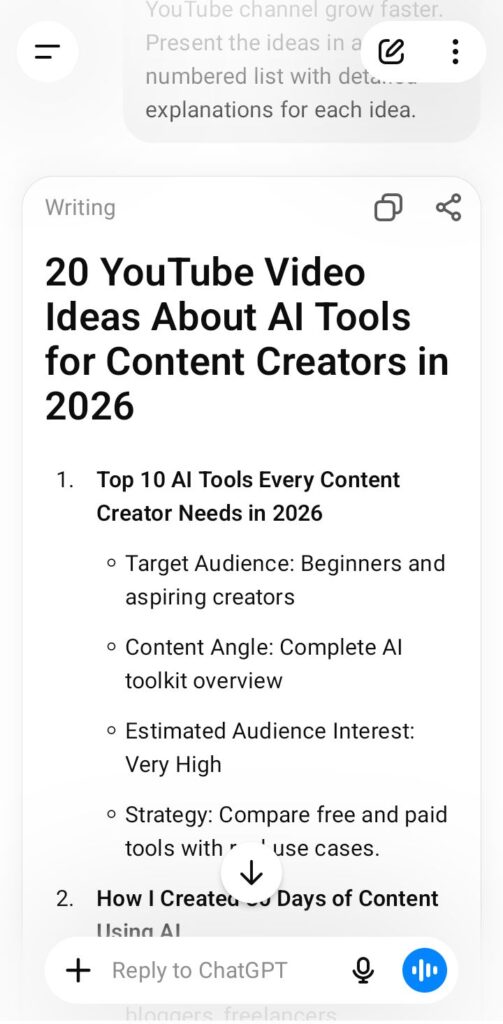
Many successful YouTubers use ChatGPT to brainstorm video ideas, write scripts, create engaging titles, generate descriptions, and organize content calendars.
Instead of staring at a blank screen wondering what video to make next, creators can use ChatGPT to generate dozens of content ideas within minutes.
Key Features
- Video idea generation
- YouTube script writing
- Content research assistance
- Video title creation
- Description writing
- Content planning
- Audience engagement ideas
Pros
- Easy to use
- Saves time
- Beginner friendly
- Supports multiple content formats
- Excellent brainstorming tool
Cons
- Requires fact-checking
- Output quality depends on prompts
- Human editing is still necessary
Real-Life Example
A technology YouTuber planning a video about AI tools can use ChatGPT to create a complete script outline, generate section ideas, and suggest engaging video titles before recording.
Best For
- New YouTubers
- Educational channels
- Tech creators
- Business channels
- Content marketers
ChatGPT helps YouTubers spend less time planning and more time creating high-quality content.
Visit ChatGPT to explore its latest features for content creators.
Claude AI
Claude AI has become one of the most powerful AI assistants for YouTubers who create educational, research-based, and long-form content.
Many creators prefer Claude because it can generate detailed responses, organize information effectively, and maintain a natural writing style. This makes it especially useful for creators who produce tutorials, business content, technology reviews, and educational videos.
Unlike many AI tools that focus on short outputs, Claude performs exceptionally well when handling complex topics and lengthy scripts.
Key Features
- Long-form script writing
- Research assistance
- Content summarization
- Video outline generation
- Brainstorming content ideas
- Content rewriting and editing
Pros
- Excellent for long YouTube scripts
- Natural writing style
- Strong reasoning capabilities
- Helpful for research-heavy videos
- Easy to understand outputs
Cons
- Some advanced features require a paid plan
- Information should still be fact-checked
- May require editing for personal style
Real-Life Example
A finance YouTuber creating a 15-minute video about investing can use Claude AI to organize research, structure the script, and simplify complex financial concepts into beginner-friendly explanations.
Best For
- Educational channels
- Business YouTubers
- Technology creators
- Finance channels
- Documentary-style content
Claude AI is particularly useful for creators who need detailed explanations and well-structured scripts.
Before choosing any AI tool, it is always a good idea to review its latest features and pricing directly from the official platform.
Visit Claude AI to learn more about its latest features for content creators.
Canva AI
Creating professional thumbnails is one of the most important parts of YouTube success.
Even the best video can struggle to get views if the thumbnail fails to attract attention.

Many successful YouTubers use Canva AI because it combines simplicity with powerful AI-assisted design tools.
Key Features
- AI thumbnail creation
- Background removal
- AI image generation
- Magic Resize
- YouTube banner design
- Social media graphics
- Presentation creation
Pros
- Beginner-friendly interface
- Large template library
- Fast design workflow
- Professional-looking results
- Works for multiple platforms
Cons
- Premium features require Canva Pro
- Some AI-generated designs may need adjustments
Real-Life Example
A gaming YouTuber can create a professional thumbnail in minutes by using Canva AI templates, AI-generated graphics, and automatic background removal features.
Best For
- YouTubers
- Bloggers
- Social media creators
- Freelancers
- Small business owners
Strong thumbnails often improve click-through rates, making Canva AI one of the most valuable tools for growing a YouTube channel.
Creators interested in improving their visual branding can explore Canva’s latest AI-powered design features through its official platform.
Visit Canva to learn more about its latest features for content creators.
Descript
Video editing is often one of the most time-consuming parts of running a YouTube channel.
Descript simplifies the editing process by allowing creators to edit videos through text-based transcripts. Instead of manually cutting clips on a timeline, creators can simply edit text, and the video updates automatically.
This feature alone can save hours of editing time every week.
Key Features
- AI video editing
- Automatic transcription
- Screen recording
- Podcast editing
- AI voice cloning
- Caption generation
- Audio enhancement
Pros
- Saves significant editing time
- Beginner-friendly interface
- Accurate transcription
- Excellent for podcasts and YouTube videos
- Easy subtitle creation
Cons
- Advanced features require a paid plan
- Learning curve for advanced editing tools
Real-Life Example
A YouTuber recording educational tutorials can use Descript to automatically transcribe videos, remove mistakes, add captions, and publish content faster than traditional editing methods.
Best For
- YouTubers
- Podcasters
- Course creators
- Educational channels
- Content marketers
Descript is especially valuable for creators who publish videos regularly and want a faster editing workflow.
Before selecting a video editing platform, creators should review the latest features and pricing plans available to ensure the tool fits their workflow and content goals.
Visit Descript to learn more about its latest features for content creators.
VidIQ
Creating great videos is only one part of YouTube success.
The real challenge is getting those videos discovered by the right audience.
VidIQ is one of the most popular YouTube growth tools because it helps creators understand keywords, trends, competition, and audience behavior.
Many successful YouTubers use VidIQ to optimize their videos before publishing.
Instead of guessing what people are searching for, creators can use real data to make smarter content decisions.
Key Features
- Keyword research
- YouTube SEO optimization
- Competitor analysis
- Trend discovery
- Video performance tracking
- AI title generation
- Channel growth insights
Pros
- Strong SEO features
- Helps increase visibility
- Easy keyword research
- Useful competitor insights
- Beginner-friendly dashboard
Cons
- Premium features require a subscription
- Some recommendations require testing
Real-Life Example
A creator planning a video about AI side hustles can use VidIQ to find low-competition keywords and optimize the title, description, and tags before publishing.
Best For
- New YouTubers
- SEO-focused creators
- Educational channels
- Tech creators
- Content marketers
VidIQ helps creators make data-driven decisions instead of relying on guesswork.
Understanding search demand and audience interests can significantly improve channel growth over time.
Creators who want to increase their YouTube visibility should explore VidIQ’s latest keyword research and channel growth tools.
Visit VidIQ to explore its latest YouTube growth and SEO features.
TubeBuddy
TubeBuddy is one of the most trusted YouTube optimization tools used by creators worldwide.
It helps YouTubers improve video SEO, manage channels more efficiently, and discover opportunities for growth.
Many creators use TubeBuddy alongside VidIQ because both tools provide valuable insights for increasing visibility on YouTube.
For creators who want to grow their channels strategically, TubeBuddy can become a powerful part of their workflow.
Key Features
- Keyword research
- SEO optimization
- Tag suggestions
- Thumbnail testing
- Title analysis
- Bulk processing tools
- Channel management features
Pros
- Improves YouTube SEO
- Saves time on channel management
- Helpful keyword suggestions
- Easy-to-use browser extension
- Useful productivity features
Cons
- Advanced tools require a paid subscription
- Some features may feel overwhelming for beginners
Real-Life Example
An educational YouTuber can use TubeBuddy to identify better keywords, optimize video titles, and test different thumbnails to improve click-through rates.
Best For
- New YouTubers
- Educational channels
- Review channels
- Tech creators
- Content marketers
TubeBuddy helps creators make smarter decisions by providing valuable optimization data directly inside YouTube.
Small improvements in SEO and click-through rates can lead to significant channel growth over time.
Creators interested in improving video performance can explore TubeBuddy’s latest optimization tools through its official platform.
Visit TubeBuddy to learn more about its YouTube optimization tools.
Midjourney
Visual content plays a major role in attracting viewers on YouTube.
Midjourney is one of the most powerful AI image generation tools available in 2026. It allows creators to generate unique, professional-quality images that can be used for thumbnails, channel branding, video illustrations, and promotional content.
Many YouTubers use Midjourney to create visuals that stand out from traditional stock images.
In a competitive YouTube environment, unique visuals can help creators improve click-through rates and build a memorable brand identity.
Key Features
- AI image generation
- Thumbnail artwork creation
- Custom illustrations
- Creative concept design
- Branding visuals
- Marketing graphics
Pros
- Exceptional image quality
- Unique artistic styles
- Excellent for thumbnail creation
- Highly creative outputs
- Strong branding possibilities
Cons
- Paid subscription required
- Requires learning effective prompts
- Generated images may need editing
Real-Life Example
A technology YouTuber creating a video about the future of AI can use Midjourney to generate futuristic thumbnail artwork that attracts more clicks than generic stock photos.
Best For
- YouTubers
- Designers
- Content creators
- Digital marketers
- Branding professionals
Custom visuals can help videos stand out in crowded search results and suggested video sections.
Creators who want unique and high-quality AI-generated artwork should explore Midjourney’s latest creative tools.
Visit Midjourney to learn more about its AI-powered image generation features.
Leonardo AI
While Midjourney is known for artistic creativity, Leonardo AI has become a favorite choice for creators who need more control over their visuals.
Many YouTubers use Leonardo AI to create custom thumbnails, channel artwork, social media graphics, and unique visual assets that help their content stand out.
One reason creators love Leonardo AI is that it provides professional-looking results without requiring advanced design skills.
Key Features
- AI image generation
- Custom image models
- Thumbnail creation
- Marketing graphics
- Creative artwork
- Product visuals
- Brand-focused designs
Pros
- Beginner-friendly interface
- Fast image generation
- High-quality visuals
- Flexible customization options
- Great for YouTube thumbnails
Cons
- Premium features require payment
- Better prompts produce better results
Real-Life Example
Imagine a YouTuber creating a video titled “Top AI Tools That Will Change Your Life in 2026.”
Instead of using generic stock images, the creator can use Leonardo AI to generate a custom futuristic thumbnail that immediately grabs attention and improves click-through rates.
Best For
- YouTubers
- Bloggers
- Designers
- Social media creators
- Digital marketers
Strong visuals often make the difference between a video getting ignored and getting clicked.
Creators looking for powerful thumbnail and graphic design capabilities should review Leonardo AI’s latest image-generation features.
Visit Leonardo AI to explore its latest AI image-generation features for content creators.
Notion AI
Running a YouTube channel is not only about creating videos.
Successful creators also need to plan content, organize ideas, manage projects, track goals, and maintain consistency.
This is where Notion AI becomes extremely valuable.
Many full-time YouTubers use Notion AI as their central workspace because it helps them organize everything in one place.
Key Features
- AI-powered note-taking
- Content planning
- Video idea management
- Project organization
- Task tracking
- Content calendars
- Productivity workflows
Pros
- Excellent organization tool
- Saves time
- Great for planning content
- Supports collaboration
- Easy to customize
Cons
- Setup may take time
- Advanced workflows require practice
Real-Life Example
A YouTuber publishing three videos every week can use Notion AI to manage content ideas, script deadlines, upload schedules, sponsorship information, and future projects inside a single dashboard.
Best For
- YouTubers
- Bloggers
- Freelancers
- Small teams
- Business owners
Many creators struggle because they focus only on creating videos and ignore organization.
Notion AI helps bring structure to the entire content creation process.
Creators interested in improving productivity and content planning should explore Notion AI’s latest features.
Visit Notion AI to learn more about its AI-powered productivity and content-planning features.
Grammarly
Even the best YouTubers make writing mistakes.
Whether you are writing video scripts, descriptions, emails, sponsorship proposals, or community posts, Grammarly helps ensure your content looks professional and polished.
Clear communication builds trust with viewers and brands.
Key Features
- Grammar correction
- Spelling checks
- Readability improvement
- Tone suggestions
- Writing enhancement
- Clarity recommendations
Pros
- Easy to use
- Improves professionalism
- Saves editing time
- Beginner-friendly
- Works across multiple platforms
Cons
- Advanced features require a premium plan
- Not every suggestion is perfect
Real-Life Example
A YouTuber preparing a sponsorship proposal can use Grammarly to eliminate grammar mistakes and create a more professional impression when contacting brands.
Best For
- YouTubers
- Bloggers
- Students
- Freelancers
- Professionals
Good writing creates credibility and helps creators build stronger relationships with their audience and business partners.
Creators who want clearer and more professional communication should explore Grammarly’s latest writing assistance tools.
Visit Grammarly to explore its latest writing and editing features.
How to Choose the Best AI Tool for Your YouTube Channel
Not every YouTuber needs the same AI tools.
The best tool for you depends on your content style, goals, budget, and workflow.
If your biggest challenge is writing scripts, ChatGPT or Claude AI may be the best choice.
If you struggle with thumbnails and visual content, Canva AI, Midjourney, or Leonardo AI can help improve your branding.
Creators who want faster editing should consider Descript, while those focused on YouTube SEO may benefit more from VidIQ and TubeBuddy.
Simple Recommendation
- Script Writing → ChatGPT, Claude AI
- Thumbnail Design → Canva AI, Leonardo AI
- Video Editing → Descript
- YouTube SEO → VidIQ, TubeBuddy
- Productivity → Notion AI
- Writing Improvement → Grammarly
Most successful YouTubers combine multiple tools instead of relying on only one platform.
Free vs Paid AI Tools
One of the most common questions creators ask is whether free AI tools are enough or if paid tools are worth the investment.
The answer depends on your goals and content volume.
Free AI Tools
Benefits of Free Tools
- No upfront investment
- Beginner-friendly
- Great for testing different platforms
- Suitable for small channels
Examples:
- ChatGPT Free
- Canva Free
- Grammarly Free
- Notion Free
Paid AI Tools
Benefits of Paid Tools
- Advanced functionality
- Better productivity
- Faster workflows
- Professional-level capabilities
Examples:
- ChatGPT Plus
- Canva Pro
- VidIQ Pro
- TubeBuddy Legend
- Midjourney
- Descript Pro
Recommendation
If you are a beginner, start with free tools.
Once your channel begins growing and generating income, consider upgrading to premium tools that directly improve your workflow and content quality.
Common Mistakes YouTubers Make When Using AI
Depending Completely on AI
AI should assist your creativity, not replace it.
The most successful YouTubers add personal experiences, opinions, and unique insights to every video.
Publishing Without Fact-Checking
AI can occasionally provide incorrect information.
Always verify facts before publishing videos.
Ignoring YouTube SEO
Even great videos may struggle if titles, descriptions, and keywords are poorly optimized.
Use tools like VidIQ and TubeBuddy to improve discoverability.
Using Too Many Tools at Once
Many beginners try ten different AI tools immediately.
Focus on mastering two or three essential tools first.
Prioritizing Quantity Over Quality
Publishing large amounts of low-quality content rarely works long term.
Helpful, engaging, and valuable content usually performs better.
Related Articles
If you enjoyed this guide, you may also find these resources helpful:
- Top 5 AI Tools for Beginners in 2026
- Best AI Tools for Bloggers in 2026
- How to Make Money with AI in 2026
- Top 10 AI Side Hustles That Can Make You Money in 2026
- Best Free AI Tools for Students in 2026
- Best AI Tools for Small Business Owners
- 10 Best AI Productivity Tools for Remote Workers in 2026
- Best AI Tools for Social Media Content Creation in 2026
- AI Agents in 2026: Complete Guide for Beginners, Businesses & Creators
These articles can help you learn more about AI tools, online earning opportunities, productivity, and content creation strategies.
Frequently Asked Questions (FAQs)
What is the best AI tool for YouTubers in 2026?
ChatGPT remains one of the best overall AI tools because it helps with brainstorming, scripting, research, and content planning.
Can AI create YouTube videos automatically?
AI can assist with scripting, editing, voiceovers, thumbnails, and optimization, but human creativity remains essential.
Which AI tool is best for YouTube thumbnails?
Canva AI, Midjourney, and Leonardo AI are among the best options for creating eye-catching thumbnails.
Is VidIQ better than TubeBuddy?
Both tools are excellent. VidIQ is often preferred for keyword research and trend analysis, while TubeBuddy offers strong channel management features.
Are AI tools worth paying for?
For creators who upload content regularly, premium AI tools can save significant time and improve productivity.
Can AI help YouTubers make money?
Yes. AI tools can help creators produce better content faster, improve SEO, increase views, grow audiences, and create more monetization opportunities.
Which AI tool is best for beginner YouTubers?
ChatGPT and Canva AI are often the best starting points because they provide immediate value and are easy to use.
Which AI Tool Should You Start With?
The YouTube landscape is becoming increasingly competitive, but AI tools are helping creators work smarter than ever before.
Whether you are a beginner launching your first channel or an experienced creator looking to scale your content production, the right AI tools can save time, improve quality, and increase efficiency.
The most successful YouTubers are not necessarily the ones using the most tools. They are the creators who understand how to combine AI with creativity, consistency, and audience-focused content.
If you are just getting started, begin with a few essential tools such as ChatGPT, Canva AI, and Grammarly.
As your channel grows, you can expand your workflow with advanced tools like Descript, VidIQ, TubeBuddy, Midjourney, and Leonardo AI.
The future belongs to creators who embrace new technologies while continuing to deliver real value to their audiences.
By using the best AI tools for YouTubers in 2026, you can save time, grow faster, and focus on what matters most: creating content that people love to watch.
Many successful creators are now combining YouTube with blogging, freelancing, and AI-powered online businesses. If your goal is to turn content creation into a long-term income source, be sure to read our complete guide on How to Make Money with AI in 2026, where we explore practical ways creators are using AI tools to generate revenue online.
About the Author
Muhammad Bilal is the founder of AI With Bilal, where he shares practical guides about Artificial Intelligence, blogging, SEO, productivity tools, freelancing, and online earning opportunities.
His mission is to help beginners understand modern technology through simple, actionable, and beginner-friendly content. Through AI With Bilal, he aims to make AI accessible for everyone, whether they are students, content creators, freelancers, or business owners.
Ready to grow your YouTube channel with AI?
Explore more AI guides, tool reviews, blogging tips, SEO tutorials, and productivity resources on AI With Bilal.
Start using AI smarter and discover the tools that can help you create better content, save time, and grow online.