
Freelancing is becoming more competitive every year, and in 2026, artificial intelligence is no longer optional—it’s a competitive advantage. Whether you’re a freelance writer, graphic designer, web developer, video editor, digital marketer, or virtual assistant, using the **Best AI Tools for Freelancers in 2026** can help you complete projects faster, improve quality, attract more clients, and increase your income.
Instead of spending hours on repetitive tasks like writing emails, editing images, creating presentations, researching information, or generating content, freelancers now use AI to automate their workflow and focus on high-value work. This saves time, reduces stress, and allows freelancers to handle more clients without sacrificing quality.
In this complete guide, you’ll discover the best AI tools trusted by freelancers worldwide. We’ll compare their features, pricing, advantages, disadvantages, and real-world use cases so you can choose the right tools for your business. Whether you’re just starting your freelancing journey or you’re an experienced professional, this guide will help you build a smarter and more profitable workflow.
By the end of this article, you’ll know exactly which AI tools deserve your attention in 2026 and how they can help you grow your freelance career.
Choosing the Best AI Tools for Freelancers in 2026 can help you save time, improve productivity, and increase your income.
Table of Contents
- – What Are AI Tools for Freelancers?
- – Why Every Freelancer Should Use AI in 2026
- – Best AI Tools for Freelancers in 2026
- – ChatGPT
- – Claude AI
- – Google Gemini
- – Canva AI
- – Grammarly
- – Notion AI
- – Perplexity AI
- – Comparison Table
- – How to Choose the Right AI Tool
- – Real Examples
- – Common Mistakes to Avoid
- – Frequently Asked Questions
- – Final Verdict
What Are AI Tools for Freelancers?
AI tools are software applications that use artificial intelligence to help freelancers complete tasks faster, improve work quality, and automate repetitive processes. Instead of replacing freelancers, these tools act as intelligent assistants that support writing, designing, coding, research, communication, project management, and client collaboration.
For example, a freelance content writer can use ChatGPT to create an outline, Grammarly to polish grammar, and Canva AI to design a featured image—all within a fraction of the time it would normally take.
Today’s AI tools can help freelancers:
– Write articles and emails
– Design graphics and presentations
– Generate social media content
– Create marketing copy
– Research information quickly
– Improve grammar and readability
– Organize projects and notes
– Brainstorm creative ideas
– Save hours every week
The goal isn’t to let AI do all the work. The goal is to eliminate repetitive tasks so freelancers can spend more time serving clients and increasing their earnings.
—
Why Every Freelancer Should Use AI in 2026
Freelancers are expected to deliver high-quality work, meet tight deadlines, and communicate professionally with clients around the world. AI tools make these responsibilities easier by improving productivity without reducing quality.
Here are some of the biggest benefits:
Save Valuable Time
AI automates repetitive work such as drafting emails, creating outlines, proofreading content, and organizing tasks. This allows freelancers to finish projects more quickly and accept more work.
## Improve Work Quality
Modern AI tools help identify grammar mistakes, improve readability, generate better ideas, and produce more professional results.
Increase Earnings
When freelancers complete projects faster, they can take on additional clients and grow their monthly income without working longer hours.
Stay Competitive
Many successful freelancers already use AI to deliver faster turnaround times and better-quality work. Learning these tools now will help you stay ahead in an increasingly competitive marketplace.
Real Example
Imagine you’re a freelance blog writer. You use ChatGPT to generate article ideas, Perplexity AI to verify facts, Grammarly to proofread the final draft, and Canva AI to create a featured image. What previously took six hours can now be completed in three or four hours—without compromising quality.
Internal Resource
If you’re interested in discovering more AI solutions, read our detailed guide:
👉 Best Free AI Tools for Students in 2026
You’ll also find useful recommendations in:
👉 Best AI Tools for Bloggers in 2026
These guides can help freelancers improve productivity, content creation, and online success.
Best AI Tools for Freelancers in 2026
The right AI tool depends on your profession, workflow, and the type of clients you work with. Some tools are excellent for writing, while others are better for design, research, or project management.
Below are the most trusted AI tools that freelancers around the world are using in 2026.
1. ChatGPT – Best Overall AI Assistant for Freelancers
ChatGPT has become one of the most valuable AI assistants for freelancers. Whether you’re writing blog posts, replying to clients, creating proposals, generating marketing copy, or brainstorming business ideas, ChatGPT can save hours of work every week.
Freelancers use ChatGPT to:
– Write professional emails
– Create Fiverr and Upwork proposals
– Generate blog outlines
– Write social media captions
– Brainstorm content ideas
– Translate and rewrite content
– Debug simple code
– Create business plans
Pros
- – Easy to use
- – Supports dozens of languages
- – Excellent for writing and research
- – Great for beginners and professionals
- – Free plan available
Cons
– Can occasionally generate inaccurate information
– Important facts should always be verified
**Official Website**(OpenAI)
Real Example
A freelance copywriter receives a request to write a 2,000-word article within 24 hours. Instead of starting from scratch, they ask ChatGPT to generate an outline, headline ideas, and key points. After adding personal research and editing, the article is completed in almost half the usual time.
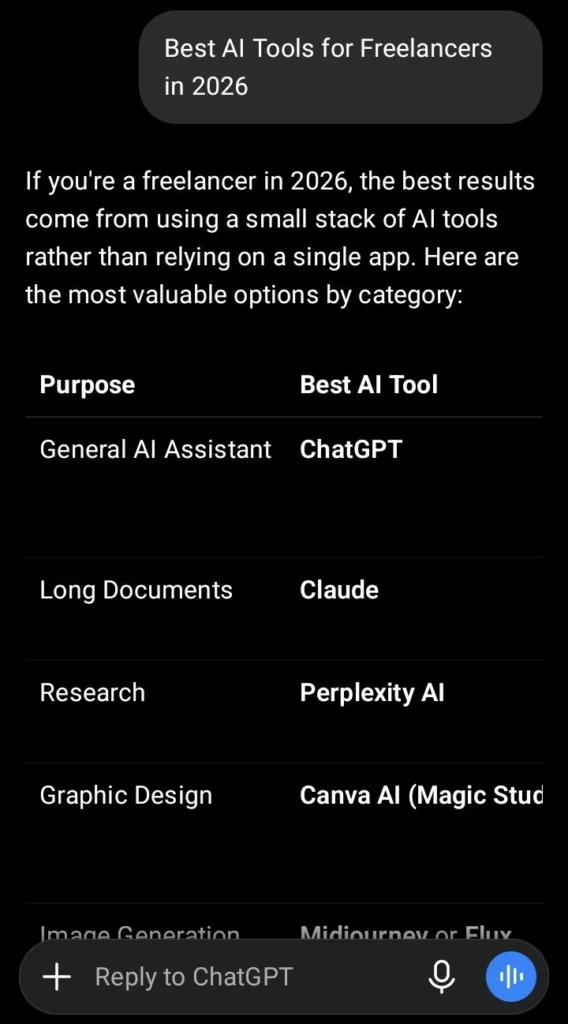
2. Claude AI – Best for Long-Form Writing
Claude AI is well known for producing natural, human-like writing. Many freelance writers, bloggers, and business consultants prefer Claude when creating detailed articles, reports, and documentation.
Claude performs especially well when handling long documents and maintaining a consistent writing style.
Best For
- – Long blog posts
- – Reports
- – Business documents
- – Research summaries
- – Editing large files
Pros
- – Excellent writing quality
- – Natural tone
- – Handles long conversations
- – Strong reasoning abilities
Cons
– Some advanced features require a paid plan.
**Official Website**(Anthropic)
Real Example
A freelance business consultant uploads a 40-page client report into Claude AI. Within minutes, Claude summarizes the report and suggests improvements, saving several hours of manual work.
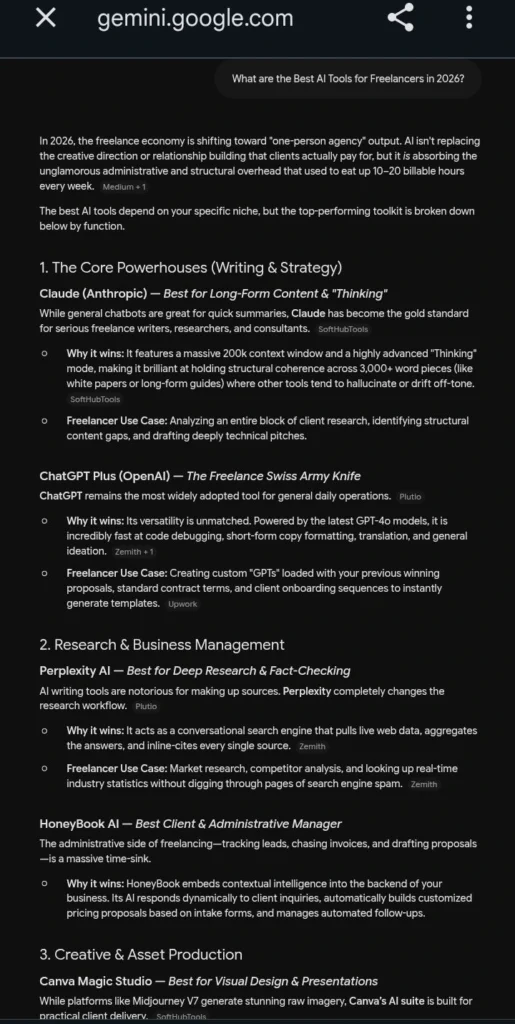
3. Google Gemini – Best for Google Workspace Users
If your freelance work depends on Gmail, Google Docs, Google Sheets, or Google Drive, Gemini can significantly improve your productivity.
Gemini integrates smoothly with Google’s ecosystem, making it easy to research information, summarize documents, draft emails, and organize projects.
Best For
- – Google Workspace users
- – Students
- – Researchers
- – Virtual assistants
- – Content creators
Pros
- – Fast responses
- – Strong integration with Google services
- – Free version available
- – Supports multiple languages
Cons
– Some premium features require a subscription.
**Official Website**(Google)
Real Example
A virtual assistant receives dozens of emails every day. Using Gemini inside Gmail, they quickly draft professional replies, summarize conversations, and organize client communication, reducing administrative work significantly.
Internal Resource
If you want to improve your writing and content marketing skills, don’t miss these detailed guides:
👉 Best AI Tools for Bloggers in 2026
👉 Best AI Tools for SEO in 2026
These articles explain how freelancers can attract more organic traffic, improve content quality, and grow their online business.
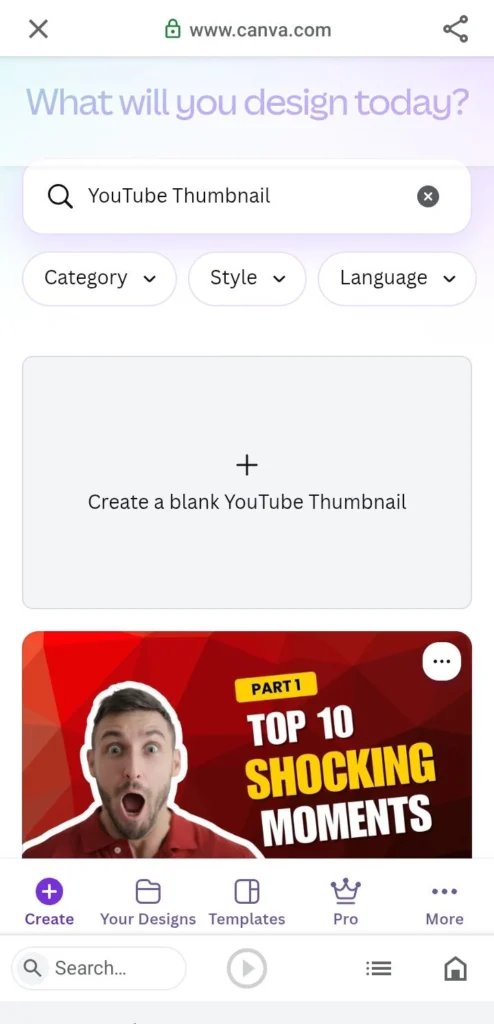
4. Canva AI – Best AI Design Tool for Freelancers
Not every freelancer is a professional designer, but every freelancer needs high-quality visuals. Whether you’re creating social media posts, YouTube thumbnails, presentations, marketing materials, or client proposals, Canva AI makes designing fast and simple.
Its AI-powered features include Magic Design, Magic Write, Background Remover, AI Image Generator, and automatic presentation creation.
Best For
- – Graphic Designers
- – Social Media Managers
- – Content Creators
- – Bloggers
- – YouTubers
- – Virtual Assistants
Pros
- – Beginner-friendly interface
- – Thousands of professional templates
- – AI-powered design tools
- – Cloud-based collaboration
- – Free plan available
Cons
– Some premium templates require Canva Pro.
**Official Website**(Canva)
Real Example
A freelancer managing a client’s Instagram account creates an entire week’s social media graphics in less than one hour using Canva AI. What previously required Photoshop skills can now be completed with simple drag-and-drop editing.
5. Grammarly – Best AI Writing Assistant
Professional communication is essential in freelancing. Even small grammar mistakes can leave a poor impression on potential clients.
Grammarly helps freelancers write clear, professional, and error-free English.
It can improve:
- – Emails
- – Client proposals
- – Blog articles
- – Reports
- – Social media posts
- – Website content
Pros
- – Excellent grammar checking
- – Tone suggestions
- – AI rewriting
- – Plagiarism checker (Premium)
- – Browser extension
Cons
– Advanced AI features require a paid plan.
**Official Website** (Grammarly)
Real Example
Before submitting a proposal on Upwork, a freelancer checks it with Grammarly. The AI corrects grammar, improves tone, and makes the proposal more professional, increasing the chances of winning the project.
6. Notion AI – Best for Project Management
Managing multiple clients becomes difficult without proper organization.
Notion AI combines note-taking, project management, document writing, brainstorming, and task planning into one workspace.
Freelancers use Notion AI to:
- – Manage projects
- – Track deadlines
- – Create content calendars
- – Store client information
- – Write meeting notes
- – Organize business ideas
Pros
- – Excellent organization
- – AI writing assistance
- – Team collaboration
- – Custom templates
Cons
– Takes time to learn for beginners.
**Official Website** (Notion)
7. Perplexity AI – Best AI Research Tool
Finding reliable information online can take hours.
Perplexity AI speeds up research by providing summarized answers with source references, making it ideal for freelancers who write articles, prepare reports, or verify facts.
Best For
- – Bloggers
- – Researchers
- – SEO Specialists
- – Content Writers
- – Business Consultants
Pros
- – Fast research
- – Source citations
- – Accurate summaries
- – Easy-to-use interface
Cons
– Some advanced models require Pro.
**Official Website** (Perplexity)
Real Example
A freelance SEO writer uses Perplexity AI to collect recent information before writing a client article. Instead of visiting multiple websites, the writer quickly reviews summarized information with linked sources.
AI Tools Comparison Table
| AI Tool | Best For | Free Plan | Overall Rating |
| AI Tool | Best For | Free Plan | Overall Rating |
|---|---|---|---|
| ChatGPT | Writing, Ideas & Productivity | ✅ Yes | ⭐⭐⭐⭐⭐ |
| Claude AI | Long-form Writing | ✅ Yes | ⭐⭐⭐⭐⭐ |
| Google Gemini | Google Workspace | ✅ Yes | ⭐⭐⭐⭐☆ |
| Canva AI | Graphic Design | ✅ Yes | ⭐⭐⭐⭐⭐ |
| Grammarly | Grammar & Writing | ✅ Yes | ⭐⭐⭐⭐⭐ |
| Notion AI | Project Management | Limited | ⭐⭐⭐⭐☆ |
| Perplexity AI | Research with Sources | ✅ Yes | ⭐⭐⭐⭐⭐ |
Expert Tips for Freelancers
Instead of depending on one AI tool, combine multiple tools to create a complete workflow.
For example:
- – Use **ChatGPT** to generate ideas.
- – Use **Perplexity AI** to verify facts.
- – Use **Grammarly** to polish your writing.
- – Use **Canva AI** to design visuals.
- – Use **Notion AI** to organize projects.
- This workflow helps freelancers deliver higher-quality work in less time while maintaining professionalism.
## Internal Resources
Want to discover more AI tools?
👉 Best AI Tools for Content Creators in 2026
👉 How to Make Money with AI in 2026
👉 Best AI Tools for Small Business Owners in 2026
These guides explain how AI can help you increase productivity, attract more clients, and build a successful online business.
How to Choose the Best AI Tool for Your Freelance Business
Choosing the right AI tool depends on your niche, workflow, budget, and the type of clients you serve. Instead of installing every AI tool available, focus on the ones that solve your biggest problems.
Here are some recommendations based on different freelance careers.
Best AI Tools by Freelance Profession
For Content Writers
If you’re a freelance writer or blogger, your ideal toolkit should include:
– ChatGPT for content ideas and drafting
– Claude AI for long-form writing
– Grammarly for grammar and style
– Perplexity AI for research
This combination helps you write faster while maintaining quality and originality.
For Graphic Designers
Graphic designers can speed up their workflow with:
- – Canva AI
- – Adobe Firefly
- – ChatGPT for creative ideas
These tools reduce design time while improving creativity.
For SEO Specialists
SEO freelancers should consider using:
- – ChatGPT
- – Perplexity AI
- – Google Gemini
- These tools help with keyword research, content planning, search intent analysis, and content optimization.
You may also enjoy our detailed guide:
👉 Best AI Tools for SEO in 2026
For Virtual Assistants
Virtual assistants usually perform repetitive administrative work.
Useful AI tools include:
- – ChatGPT
- – Gemini
- – Notion AI
- – Grammarly
These applications help manage emails, meeting notes, scheduling, and client communication more efficiently.
For Developers
Freelance developers can improve coding productivity with:
- – ChatGPT
- – Claude AI
- – GitHub Copilot
These tools help explain code, debug problems, generate functions, and improve documentation.
Common Mistakes Freelancers Make When Using AI
AI is a powerful assistant, but it should never replace your expertise.
Avoid these common mistakes:
1. Publishing AI Content Without Editing
Always review AI-generated content before sending it to clients or publishing it online.
2. Ignoring Fact Checking
AI models occasionally generate outdated or incorrect information.
Always verify statistics, product pricing, and important facts using official sources.
3. Depending on Only One Tool
Each AI tool has different strengths.
Combining multiple AI tools usually produces much better results.
4. Forgetting Human Creativity
Clients still value original thinking, personal experience, and creative problem-solving.
AI should assist your work—not replace your expertise.
AI Trends Every Freelancer Should Watch in 2026
Artificial intelligence continues to evolve rapidly.
Some of the biggest trends include:
- – AI agents that perform complete workflows
- – Voice-controlled AI assistants
- – AI video generation
- – AI coding assistants
- – AI business automation
- – Personalized AI workspaces
- – Multimodal AI capable of understanding text, images, audio, and video together
- Freelancers who learn these technologies early will have a significant competitive advantage.
Frequently Asked Questions (FAQs)
What is the best AI tool for freelancers in 2026?
ChatGPT is one of the best overall AI tools for freelancers because it helps with writing, brainstorming, client communication, research, coding, and productivity. However, the best choice depends on your profession and workflow.
Are AI tools free to use?
Many AI tools offer generous free plans. ChatGPT, Google Gemini, Canva AI, Grammarly, Claude AI, and Perplexity AI all provide free versions, while premium plans unlock advanced features.
Which AI tool is best for freelance writers?
Freelance writers often achieve the best results by combining ChatGPT for drafting, Claude AI for long-form writing, Grammarly for editing, and Perplexity AI for research.
Can AI replace freelancers?
No. AI is designed to assist freelancers rather than replace them. Clients still value creativity, industry expertise, communication skills, and human judgment that AI cannot fully replicate.
Which AI tool is best for graphic designers?
Canva AI is one of the most beginner-friendly AI design tools. Professional designers may also benefit from Adobe Firefly for advanced creative projects.
Is it safe to use AI tools for client work?
Yes, but always review AI-generated content before delivering it. Avoid sharing confidential client information with AI platforms unless you understand their privacy policies.
Which AI tool is best for research?
Perplexity AI is one of the best research assistants because it provides summarized answers along with source references, making fact-checking much easier.
Can AI help freelancers earn more money?
Absolutely. AI helps freelancers complete projects faster, improve work quality, serve more clients, and increase productivity, which can lead to higher earnings over time.
Final Verdict
Artificial intelligence is transforming freelancing faster than ever before. Instead of replacing skilled professionals, AI is becoming a powerful assistant that helps complete tasks more efficiently.
For most freelancers, the ideal workflow is not relying on a single tool but combining several AI solutions. For example, use ChatGPT for brainstorming and writing, Perplexity AI for research, Grammarly for polishing content, Canva AI for design, and Notion AI for organizing projects.
The freelancers who embrace AI today will be better prepared to compete, deliver higher-quality work, and grow their businesses in the years ahead.
The Best AI Tools for Freelancers in 2026 continue to evolve with new features that help professionals save time, improve productivity, and deliver better results. Choosing the Best AI Tools for Freelancers in 2026 based on your workflow and business goals can give you a competitive advantage in today’s freelancing market.
Conclusion
Finding the **Best AI Tools for Freelancers in 2026** isn’t about choosing the most expensive software—it’s about selecting the right tools for your workflow.
Whether you’re a writer, designer, developer, marketer, virtual assistant, or business consultant, AI can help you save time, improve productivity, and deliver better results to your clients.
Start with one or two tools, master them, and gradually build an AI-powered workflow that supports your freelance career.
The future of freelancing belongs to professionals who combine human creativity with artificial intelligence.
The Best AI Tools for Freelancers in 2026 are essential for every modern freelancer who wants to stay competitive.
Explore More Helpful Guides
If you found this article useful, you may also enjoy:
👉 Best AI Tools for Bloggers in 2026
👉 Best AI Tools for Content Creators in 2026
👉 Best AI Tools for SEO in 2026
👉 How to Make Money with AI in 2026
👉 Best AI Tools for Small Business Owners in 2026
These guides will help you build a smarter workflow and grow your online income using AI.
About the Author
**Muhammad Bilal Malik** is the founder of **AI With Bilal**, where he publishes practical, beginner-friendly guides on artificial intelligence, blogging, SEO, freelancing, and online business. His mission is to help students, creators, and professionals discover the best AI tools and use them to improve productivity and build successful digital care