
Introduction
AI Tools for Teachers are no longer a futuristic idea. In 2026, educators across the United States are using artificial intelligence to create lesson plans, grade assignments, generate quizzes, communicate with parents, and personalize learning experiences.
Teaching is one of the most demanding professions. Between lesson planning, grading, classroom management, and administrative tasks, many teachers struggle to find enough time in the day. That is where AI can help.
After reviewing dozens of education-focused AI platforms and analyzing how teachers use them in real classrooms, I found that the best results come from tools that save time without replacing the teacher’s expertise. Many educators now use multiple AI tools together to streamline their workflow and improve student outcomes.
As an AI blogger and software reviewer, I have tested dozens of AI-powered education tools over the past year. This guide is based on hands-on research, feature comparisons, and real classroom use cases to help teachers choose the right solution.
If you are interested in exploring more ways to use AI in daily work, you can also check our guide on AI tools for small business owners in 2026, which explains how automation is changing modern online business.
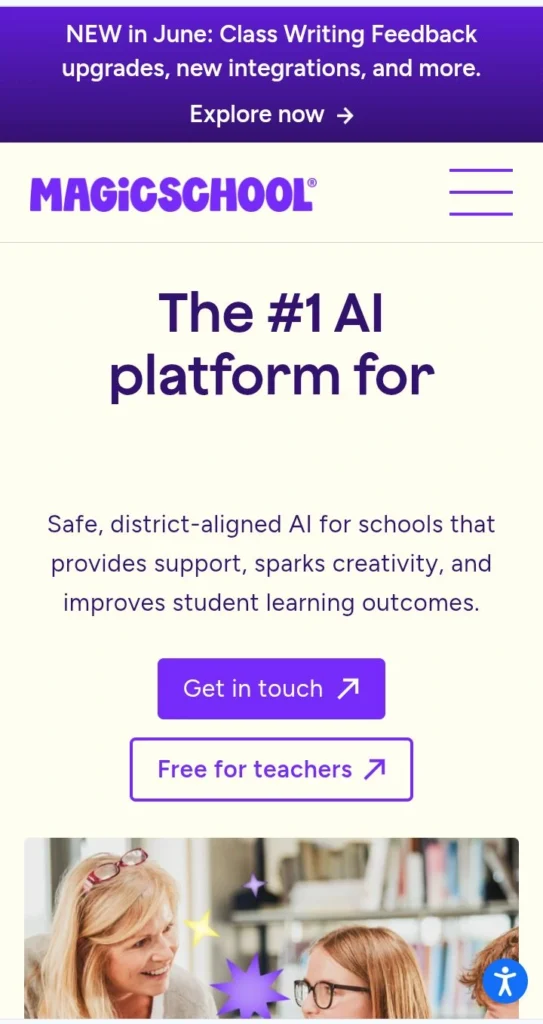
Table of Contents
- What Are AI Tools for Teachers?
- Why Teachers Need AI in 2026
- Benefits of AI in Education
- Best AI Tools for Teachers
- Feature Comparison Table
- Pricing Comparison
- Pros and Cons
- Real Classroom Experience
- Common Mistakes to Avoid
- How to Choose the Right AI Tool for Your Classroom
- Expert Tips
- FAQs
- Final Verdict
What Are AI Tools for Teachers?
AI tools for teachers are software applications powered by artificial intelligence that help educators automate repetitive tasks and improve classroom productivity.
These tools can:
- Create lesson plans
- Generate quizzes
- Design worksheets
- Summarize educational content
- Draft parent emails
- Create presentations
- Personalize learning materials
Instead of spending hours on paperwork, teachers can focus more on student engagement and learning.
Why Teachers Need AI in 2026
Education continues to evolve rapidly.
Schools are adopting digital learning platforms, hybrid classrooms, and personalized learning strategies. At the same time, teacher workloads continue to increase.
Recent research and industry reports show that teachers using AI weekly save several hours every week through lesson planning, assessment creation, and classroom preparation.
Key Challenges Teachers Face
- Limited planning time
- Growing administrative work
- Diverse student learning needs
- Increased parent communication
- Assessment and grading workload
AI tools help reduce these challenges without replacing the human side of teaching.
The growing demand for AI in education is similar to other industries. For example, in our article on AI productivity tools for professionals, we explain how AI is saving hours of manual work every day.
Many schools and educators in the United States are increasingly adopting digital learning systems supported by Google for Education, which provides tools for modern classroom collaboration, online assignments, and learning management systems.
The increasing adoption of AI in education reflects a broader trend across multiple industries. Similar productivity improvements can also be seen in our guide on AI productivity tools for remote workers, where AI helps professionals automate repetitive tasks and save valuable time.
Benefits of Using AI Tools for Teachers
- Faster Lesson Planning
Teachers can generate complete lesson plans in minutes rather than hours.
- Personalized Learning
AI can adapt content for different reading levels and learning abilities.
- Better Student Engagement
Interactive quizzes, AI-generated activities, and visual learning materials improve classroom participation.
- Reduced Administrative Work
Tasks such as report writing, email drafting, and content creation become much faster.
- Improved Accessibility
Many AI education tools can simplify reading materials, translate content, and support students with diverse learning needs.
Organizations like Microsoft Education are also investing heavily in AI-powered classroom solutions that help teachers improve productivity, automate grading tasks, and enhance digital learning experiences in modern classrooms.
Many of the AI platforms used by educators are also popular among content creators, bloggers, and freelancers. You can explore additional examples in our guide to the best AI tools for content creators in 2026.
Best AI Tools for Teachers in 2026
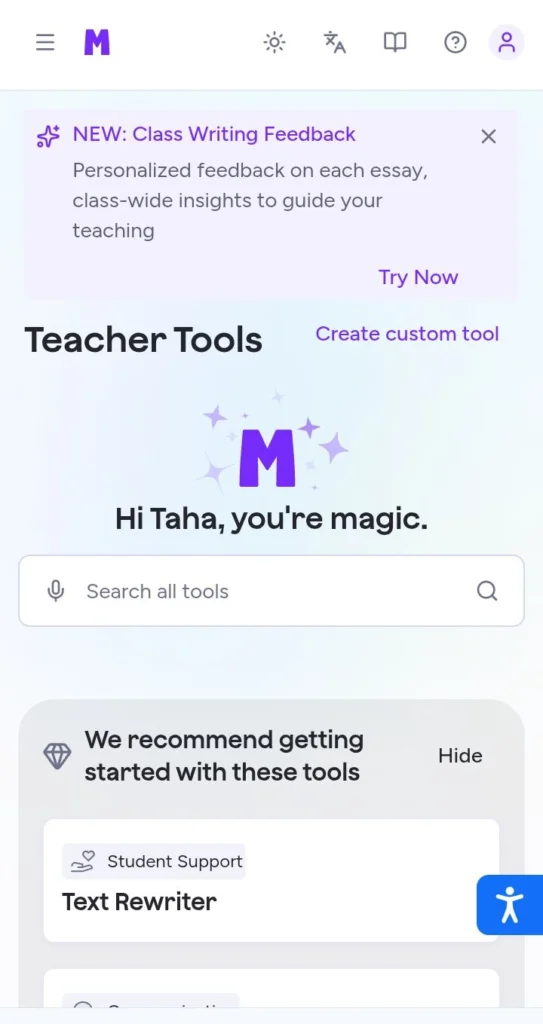
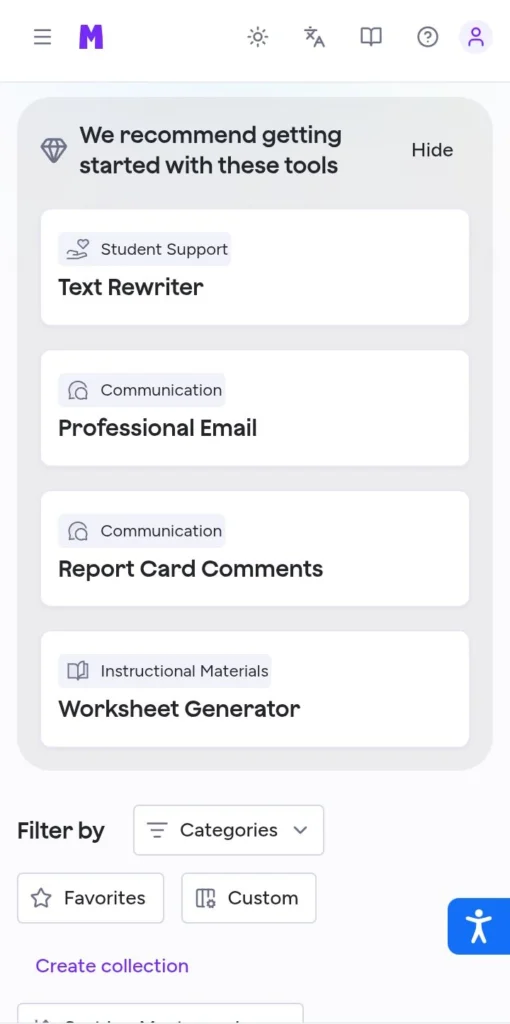
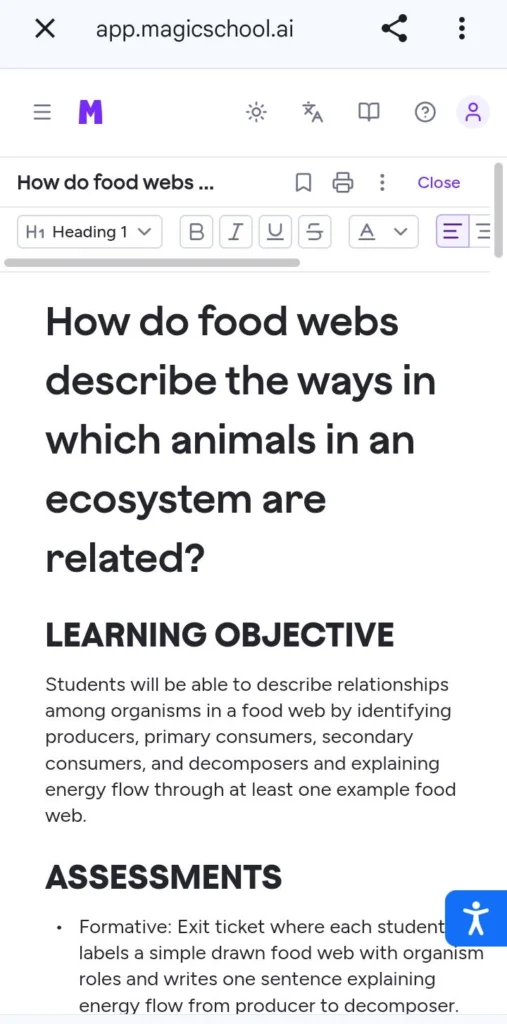
1. MagicSchool AI – Best Overall
MagicSchool AI is designed specifically for educators and includes dozens of classroom-focused tools. Many experts consider it the most complete AI platform for teachers in 2026.
Best For:
- Lesson planning
- Rubrics
- Parent communication
- Classroom management
Pros:
- Built specifically for teachers
- Easy to use
- Large collection of tools
Cons:
- Some premium features require a paid plan
2. ChatGPT – Best for Content Creation
ChatGPT remains one of the most versatile classroom assistants available today. Teachers use it for lesson plans, quizzes, writing support, classroom activities, and brainstorming.
Best For:
- Lesson planning
- Quiz generation
- Classroom activities
- Writing assistance
Pros:
- Extremely flexible
- Fast content generation
- Easy to learn
Cons:
- Requires fact-checking
Teachers who want a deeper comparison between leading AI assistants can explore our detailed ChatGPT vs Gemini vs Claude comparison guide, where we analyze strengths, weaknesses, and real-world use cases.
3. Google Gemini – Best for Google Classroom Users
Google Gemini works well inside the Google ecosystem and helps teachers create content, conduct research, and improve productivity.
Best For:
- Research
- Google Workspace
- Classroom content creation
Pros:
- Excellent integration
- Strong productivity features
Cons:
- Advanced features may require paid plans
4. Diffit – Best for Differentiated Learning
Diffit helps teachers adapt educational content for different student levels. This makes it easier to support struggling learners while still challenging advanced students.
Best For:
- Reading level adjustments
- Personalized learning
- Classroom differentiation
Pros:
- Saves significant preparation time
- Excellent for mixed-ability classrooms
- Easy-to-use interface
Cons:
- Limited free plan features
5. Khanmigo – Best AI Tutor
Khanmigo is an AI-powered educational assistant developed by Khan Academy.
Unlike many AI chatbots, Khanmigo is specifically designed for education and guided learning.
Best For:
- Student tutoring
- Homework support
- Personalized learning
Pros:
- Education-focused
- Safe learning environment
- Strong academic support
Cons:
- Not ideal for content creation
6. Brisk Teaching – Best Browser Extension
Brisk Teaching works directly inside your browser and integrates with educational platforms.
Teachers can quickly create assignments, provide feedback, and improve productivity.
Best For:
- Feedback generation
- Assignment creation
- Workflow automation
Pros:
- Very fast
- Easy integration
- Saves time daily
Cons:
- Requires adaptation period
7. Canva AI – Best for Classroom Visuals
Canva AI helps teachers create professional presentations, posters, worksheets, and classroom resources.
Best For:
- Educational graphics
- Presentations
- Classroom posters
Pros:
- Beginner-friendly
- Large template library
- Visual content creation
Cons:
- Some AI features require premium access
8. Quizizz AI – Best for Assessments
Quizizz AI allows teachers to create engaging quizzes in minutes.
Best For:
- Quizzes
- Homework
- Interactive learning
Pros:
- High student engagement
- Fast quiz creation
- Gamified learning
Cons:
- Limited customization in free version
9. Curipod – Best for Interactive Lessons
Curipod helps educators create engaging and interactive classroom presentations.
Best For:
- Interactive teaching
- Student participation
- Presentation-based learning
Pros:
- Interactive design
- Easy lesson creation
- Student-focused
Cons:
- Smaller feature set than some competitors
10. Education Copilot – Best Lesson Planning Assistant
Education Copilot specializes in helping teachers create lesson plans and classroom materials quickly.
Best For:
- Lesson planning
- Classroom resources
- Teaching support
Pros:
- Fast lesson generation
- Teacher-focused workflow
Cons:
- Fewer advanced AI capabilities
If you want to compare leading AI platforms in detail, you can also read our comparison of ChatGPT vs Gemini vs Claude to understand which AI model performs best for different tasks.
Feature Comparison Table
| Tool | Lesson Plans | Quizzes | AI Chat | Presentations | Student Support |
|---|---|---|---|---|---|
| MagicSchool AI | Yes | Yes | Yes | Yes | Yes |
| ChatGPT | Yes | Yes | Yes | Limited | Yes |
| Google Gemini | Yes | Yes | Yes | Limited | Yes |
| Diffit | Limited | No | No | No | Excellent |
| Khanmigo | Limited | No | Yes | No | Excellent |
| Brisk Teaching | Yes | Yes | Limited | No | Yes |
| Canva AI | No | No | Limited | Excellent | Limited |
| Quizizz AI | No | Excellent | No | No | Good |
| Curipod | Limited | Limited | No | Excellent | Good |
| Education Copilot | Excellent | Limited | No | No | Good |
These tools are also widely used outside education. In our guide on the best AI tools for content creators, we show how bloggers, YouTubers, and freelancers use similar platforms for daily work.
Pricing Comparison Table
| Tool | Free Plan | Paid Plan Starts At |
|---|---|---|
| MagicSchool AI | Yes | $12/month |
| ChatGPT | Yes | $20/month |
| Google Gemini | Yes | $20/month |
| Diffit | Yes | Custom Pricing |
| Khanmigo | Limited | Varies |
| Brisk Teaching | Yes | Custom Pricing |
| Canva AI | Yes | $15/month |
| Quizizz AI | Yes | Custom Pricing |
| Curipod | Yes | Custom Pricing |
| Education Copilot | Trial Available | Custom Pricing |
Note:
Pricing may change over time. Always verify current pricing from official websites before purchasing.
Pros and Cons Table
| Benefits of AI Tools for Teachers | Potential Drawbacks |
|---|---|
| Save planning time | Requires fact-checking |
| Improve productivity | Learning curve |
| Increase student engagement | Some tools require paid plans |
| Support personalized learning | Privacy considerations |
| Reduce repetitive tasks | Risk of over-reliance |
| Speed up assessment creation | Internet dependency |
Step-by-Step Guide: How Teachers Can Start Using AI
Step 1: Choose One Tool
Start with ChatGPT or MagicSchool AI.
Step 2: Identify a Time-Consuming Task
Examples:
- Lesson planning
- Quiz creation
- Parent communication
Step 3: Use AI for Assistance
Ask AI to generate:
- Lesson plans
- Activities
- Worksheets
- Assessment questions
Step 4: Review and Edit
Always verify accuracy before using content with students.
Step 5: Measure Time Saved
Track how many hours you save each week.
Real Classroom Experience
Many teachers initially worry that AI will replace traditional teaching.
In practice, the opposite happens.
The most successful educators use AI as an assistant rather than a replacement. AI handles repetitive tasks while teachers focus on instruction, mentoring, and student relationships.
For example:
- A teacher can generate a lesson outline in minutes.
- AI can create multiple quiz versions.
- Reading materials can be adapted for different student levels.
The result is more time spent teaching and less time spent on administrative work.
Common Mistakes to Avoid When Using AI Tools for Teachers
AI can be incredibly helpful, but many educators make avoidable mistakes when getting started.
- Trusting AI Without Verification
AI-generated content can occasionally contain outdated or inaccurate information.
Always review:
- Facts
- Statistics
- Historical information
- Scientific explanations
Before presenting content to students.
- Using Only One AI Tool
Different tools excel at different tasks.
For example:
- ChatGPT → Content creation
- MagicSchool AI → Teaching workflows
- Canva AI → Visual content
- Quizizz AI → Assessments
Combining tools often delivers the best results.
- Ignoring Student Needs
AI should support personalized learning.
Avoid creating identical content for every student.
Instead:
- Adjust reading levels
- Modify activities
- Personalize assignments
Based on student requirements.
- Over-Automating the Classroom
Students still need human interaction.
AI should assist teachers—not replace them.
The most successful classrooms use AI to save time while keeping the teacher at the center of learning.
- Failing to Learn Prompting Skills
Better prompts produce better results.
Instead of writing:
“Create a lesson.”
Try:
“Create a 45-minute 8th-grade science lesson on ecosystems including activities, discussion questions, and assessment ideas.”
The difference in quality is significant.
How to Choose the Right AI Tool for Your Classroom
With so many AI tools available in 2026, choosing the right one can feel overwhelming. The best option depends on your teaching style, classroom needs, budget, and goals.
Before selecting an AI tool, take a moment to identify the challenges you want to solve. Some teachers need help with lesson planning, while others want better assessment tools, classroom presentations, or personalized learning support.
Consider Your Primary Goal
Start by asking yourself what task takes up the most time each week.
If lesson planning consumes hours of your schedule, tools like MagicSchool AI and ChatGPT can be excellent choices. If you spend a lot of time creating presentations and visual content, Canva AI may be a better fit.
For assessment creation and quizzes, Quizizz AI offers powerful features that help teachers create engaging learning experiences.
Evaluate Ease of Use
A powerful tool is only useful if you can learn it quickly.
Look for platforms with:
- Simple dashboards
- Easy navigation
- Helpful tutorials
- Teacher-focused features
Most educators prefer tools that can be implemented without extensive training.
Check Classroom Compatibility
Not every AI tool works equally well in every classroom environment.
Consider:
- Student age group
- Subject area
- School policies
- Existing technology systems
For example, Google Gemini may be ideal for schools already using Google Workspace, while MagicSchool AI is designed specifically for educators.
Compare Free and Paid Plans
Many AI education tools offer free plans that are sufficient for beginners.
Before purchasing a subscription, test the free version and evaluate whether premium features provide enough value for your teaching needs.
Important factors include:
- Usage limits
- Available features
- Number of generated resources
- Collaboration options
Prioritize Student Privacy
Student data protection should always be a top priority.
Before adopting any AI platform, review its privacy policy and ensure it complies with your school’s requirements and educational regulations.
Choose trusted providers that clearly explain how user data is collected, stored, and protected.
Look for Long-Term Value
The best AI tool is not necessarily the one with the most features. Instead, focus on tools that consistently save time and improve learning outcomes.
Ask yourself:
- Does this tool reduce my workload?
- Does it improve student engagement?
- Is it easy to use regularly?
- Will it still be useful six months from now?
If the answer is yes, it is likely a worthwhile investment.
If you are looking for free options before investing in premium subscriptions, our complete guide to the best free AI tools in 2026 covers several powerful tools that educators can start using immediately.
Quick Selection Guide
| If You Need | Recommended Tool |
|---|---|
| Lesson Planning | MagicSchool AI |
| Content Creation | ChatGPT |
| Google Classroom Integration | Google Gemini |
| Visual Presentations | Canva AI |
| Quiz Creation | Quizizz AI |
| Personalized Learning | Diffit |
| Student Tutoring | Khanmigo |
| Browser-Based Productivity | Brisk Teaching |
By selecting the right AI tool based on your specific classroom needs, you can save valuable time, improve productivity, and create a more engaging learning experience for your students.
Expert Tips for Getting the Best Results
Tip #1: Create Prompt Templates
Save prompts for:
- Lesson plans
- Quizzes
- Parent emails
- Classroom activities
This saves even more time.
Tip #2: Use AI for Brainstorming
Many teachers use AI to generate fresh classroom ideas when they feel stuck.
AI can suggest:
- Activities
- Projects
- Group exercises
- Discussion topics
Tip #3: Personalize Learning Materials
One of the biggest advantages of AI education tools is content customization.
You can create:
- Beginner versions
- Standard versions
- Advanced versions
Of the same lesson within minutes.
Tip #4: Combine AI With Human Creativity
The best teaching still comes from teachers.
Use AI to generate ideas and drafts, then add your expertise and classroom experience.
Tip #5: Stay Updated
AI technology evolves quickly.
New features appear every month.
Teachers who stay informed often gain the greatest productivity benefits.
If you are building a long-term AI strategy, our guide on AI tools for website builders in 2026 will help you understand how automation is transforming web development.
Frequently Asked Questions
What are the best AI tools for teachers in 2026?
The best AI tools for teachers in 2026 include ChatGPT, MagicSchool AI, Google Gemini, Diffit, Khanmigo, Canva AI, Quizizz AI, Curipod, Brisk Teaching, and Education Copilot.
Are AI tools for teachers free?
Many AI tools for teachers offer free plans with limited features. Premium plans typically provide advanced functionality and higher usage limits.
Can AI replace teachers?
No.
AI can automate repetitive tasks and improve productivity, but it cannot replace the human connection, mentorship, and classroom leadership provided by teachers.
Which AI tool is best for lesson planning?
MagicSchool AI and ChatGPT are currently among the strongest options for lesson planning and classroom content creation.
Which AI tool is best for creating quizzes?
Quizizz AI is one of the best platforms for creating engaging quizzes and interactive assessments.
Are AI education tools safe for schools?
Most major educational AI platforms follow privacy and security standards. However, schools should review privacy policies and data-handling practices before implementation.
How much time can teachers save with AI?
Many educators report saving between 5 and 10 hours per week by using AI tools for lesson planning, grading assistance, and administrative work.
Quick Recommendation:
Best Overall: MagicSchool AI
Best Free Option: ChatGPT
Best for Visual Content: Canva AI
Best for Assessments: Quizizz AI
Best for Personalized Learning: Diffit
Educational platforms such as Khan Academy continue to play a major role in modern learning systems, especially with AI-powered tutoring systems like Khanmigo that focus on personalized student learning and academic support.
Conclusion
AI Tools for Teachers have become essential productivity solutions in modern education. They help educators save time, improve lesson quality, personalize learning, and reduce administrative workload.
Whether you teach elementary school, high school, college, or online courses, the right AI platform can significantly improve your workflow.
The key is to use AI as a teaching assistant rather than a replacement for professional expertise.
By combining artificial intelligence with effective teaching practices, educators can create better learning experiences while reclaiming valuable time.
Final Verdict
After reviewing dozens of educational AI platforms, these are the top recommendations:
🏆 Best Overall:
MagicSchool AI
🏆 Best for Content Creation:
ChatGPT
🏆 Best for Google Users:
Google Gemini
🏆 Best for Visual Learning:
Canva AI
🏆 Best for Assessments:
Quizizz AI
🏆 Best for Personalized Learning:
Diffit
If you are just starting, ChatGPT and MagicSchool AI provide the best combination of flexibility, ease of use, and classroom value.
Call To Action
Ready to save hours every week and improve your teaching workflow?
Start by testing one AI tool from this list and use it for lesson planning, assessment creation, or classroom communication.
Small changes can create significant results.
Have you used any of these AI tools for teachers?
Share your experience in the comments and let other educators know which platform works best for your classroom.