

Affiliate Disclosure: This article contains affiliate links. If you purchase through our links, we may earn a commission at no extra cost to you. This does not affect our opinions or review.
Creating short-form videos from long YouTube videos, podcasts, and webinars can take considerable time. AI video clipping tools can simplify this process by identifying useful moments and turning them into shorter videos for social media. In this Klap AI Review 2026, I share the platform’s features, pricing, advantages, limitations, and my own hands-on testing experience.
If you are exploring more software options, visit our guide to the best AI tools for creators and digital professionals.
Quick Verdict: Klap AI is worth considering if you regularly create long-form videos and want to repurpose them into short-form content. In my own test, I uploaded a video longer than 60 minutes and generated more than 13 clips with excellent video quality and correct captions.
What Is Klap AI?
Klap AI is an AI-powered video repurposing platform that converts long-form videos into shorter clips suitable for platforms such as TikTok, Instagram Reels, and YouTube Shorts.
The platform analyzes video content, identifies potentially engaging moments, reframes footage for vertical formats, and generates animated captions. It is designed to help creators repurpose existing content without manually editing every clip from the beginning.
For more resources about video creation and related software, explore our AI tools collection and YouTube-related articles.
Key Features of Klap AI
Klap offers several features designed to simplify short-form video production. The following are based on the platform’s official product information.
- AI-Powered Clip Selection: Analyzes long videos and identifies potentially useful moments that can work as standalone short clips.
- AI Active-Speaker Reframing: Automatically adjusts video framing to keep the active speaker visible in vertical formats.
- Animated Captions: Generates captions with customizable text styles and visual highlights.
- 99+ Language Support: Supports transcription and video editing in more than 99 languages.
- Multiple Aspect Ratios: Supports formats such as 9:16, 1:1, 4:5, and 16:9.
- Editing and Scheduling: Allows creators to edit generated clips and schedule or publish content to supported social platforms.
For a complete explanation of its workflow and supported features, visit the official Klap How It Works guide.
Klap AI Free Trial: Can You Try It for Free?
Yes. According to Klap’s official information, new users can try the platform on one video without providing a credit card. You can preview and edit the generated clips inside the platform.
However, downloading or publishing the finished clips requires a paid subscription. This gives new users an opportunity to explore the clipping process before choosing a plan.
My Hands-On Klap AI Test: Real Results
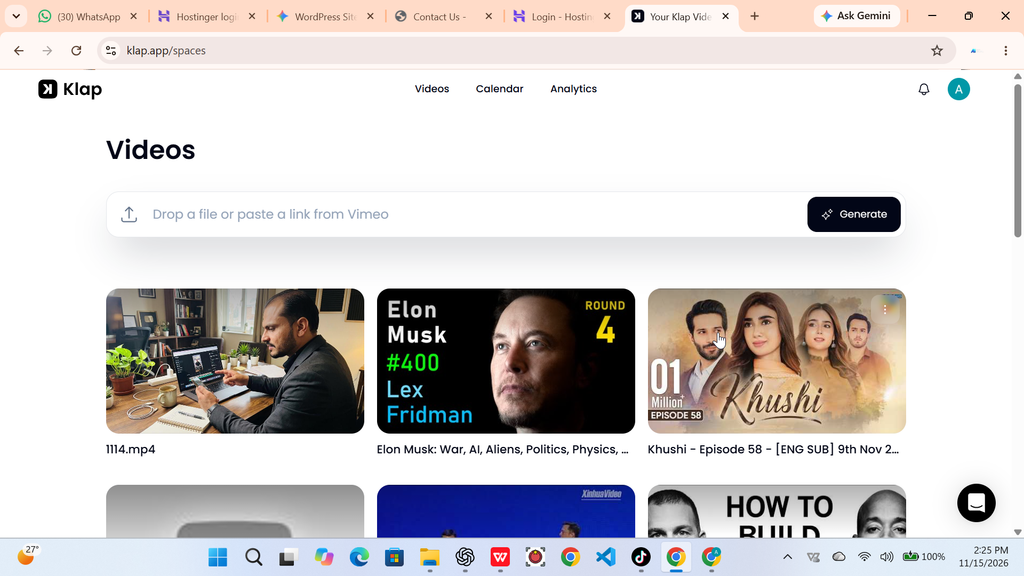
Instead of relying only on product descriptions, I tested Klap using my own account. I uploaded a long-form video exceeding 60 minutes to see how the platform handled real video repurposing.
Here are my actual results:
- Original video duration: More than 60 minutes.
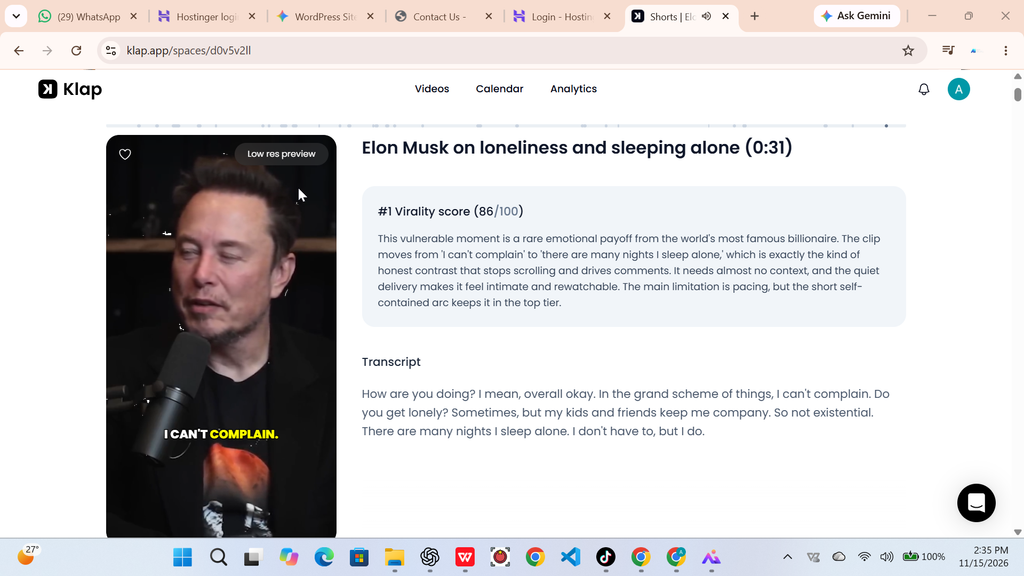
- Generated clips: More than 13 clips from one upload.
- Video quality: Excellent.
- Automatic captions: Correct in my test.
- Problems encountered: No major problems during testing.
The results were encouraging. Klap generated more than 13 clips from my original video, and I was satisfied with the video quality and captions. I did not encounter any major problems during this test.
These results reflect my experience with one specific video. They should not be considered a guarantee that every video will produce the same number or quality of clips. I also did not personally test every advanced feature of the platform.
Klap AI Pricing and Plans (November 2026)
Klap offers three main subscription plans for different content production needs. The following prices and clip allowances are based on its official pricing information checked in November 2026.
- Basic: $29 per month with monthly billing, or $174 for a year. Includes 100 clips per month on monthly billing.
- Pro: $79 per month with monthly billing, or $474 for a year. Includes 300 clips per month on monthly billing.
- Pro+: $189 per month with monthly billing, or $1,134 for a year. Includes 1,000 clips per month on monthly billing.
Important billing information: Annual subscriptions are paid upfront. Their total yearly clip allowances are 1,200 for Basic, 3,600 for Pro, and 12,000 for Pro+. Annual plans provide the full yearly clip allowance as a pool rather than charging the annual amount every month.
Prices are in US dollars and may change. Check the official Klap pricing page before purchasing to confirm the latest prices and plan details.
Klap AI Pros and Cons
Here is a balanced overview of Klap AI’s advantages and limitations, based on its published features, subscription terms, and my own testing experience.
Pros
- Automatically identifies potential highlights in long-form videos.
- Converts horizontal videos into vertical short-form formats.
- Offers animated captions and support for more than 99 languages.
- Provides different subscription plans for different clip requirements.
- My test produced more than 13 clips with excellent video quality and correct captions.
Cons
- The free trial allows testing one video, but downloading and publishing clips requires a paid plan.
- Monthly clip allowances are limited by the selected subscription plan.
- Creators producing large volumes of clips may need a higher-priced subscription.
Who Should Use Klap AI?
Klap AI may be useful for several types of content creators:
- YouTubers: Turn longer videos into shorter clips for additional social media content.
- Podcasters: Repurpose interviews and podcast episodes into short highlights.
- Digital Marketers: Create short promotional videos from longer presentations and recordings.
- Online Educators: Convert lessons and webinars into smaller educational clips.
- Content Agencies: Manage short-form video production for multiple clients.
Frequently Asked Questions About Klap AI
Is Klap AI worth it in 2026?
Klap AI is worth considering if you regularly produce long-form videos and want to turn them into short clips. My own test produced more than 13 clips from a video longer than 60 minutes, with excellent quality and correct captions.
Can I use Klap AI for free?
Yes. Klap allows you to process one video for free without a credit card. However, downloading and publishing the final clips requires a paid plan.
How many clips can Klap AI generate?
The monthly allowances are 100 clips on Basic, 300 on Pro, and 1,000 on Pro+. The actual number generated from an individual video depends on its content and the clip-generation settings.
Does Klap AI support multiple languages?
Yes. Klap officially advertises support for more than 99 languages for transcription and video editing.
Can Klap AI create YouTube Shorts and Instagram Reels?
Yes. Klap can create vertical clips suitable for platforms such as YouTube Shorts, Instagram Reels, and TikTok.
Does Klap AI add a watermark?
According to Klap’s official information, downloaded or published clips on paid plans do not carry Klap branding.
Final Verdict: Is Klap AI Worth Trying?
Klap AI is a useful option for creators who want to repurpose long-form video content into shorter social media clips. Its automated clip selection, captions, reframing, and different subscription options make it worth considering for regular video production.
My personal test was positive: I uploaded a video longer than 60 minutes and received more than 13 clips with excellent video quality and correct captions. Although this was only one test, it gave me a good first impression of the platform’s core video repurposing workflow.
If you regularly create long videos and want to explore automated short-form editing, you can try Klap yourself before deciding whether a paid subscription is right for you.
Ready to test Klap AI? Start with your own video and see how its clipping process works.